What is Jitsi
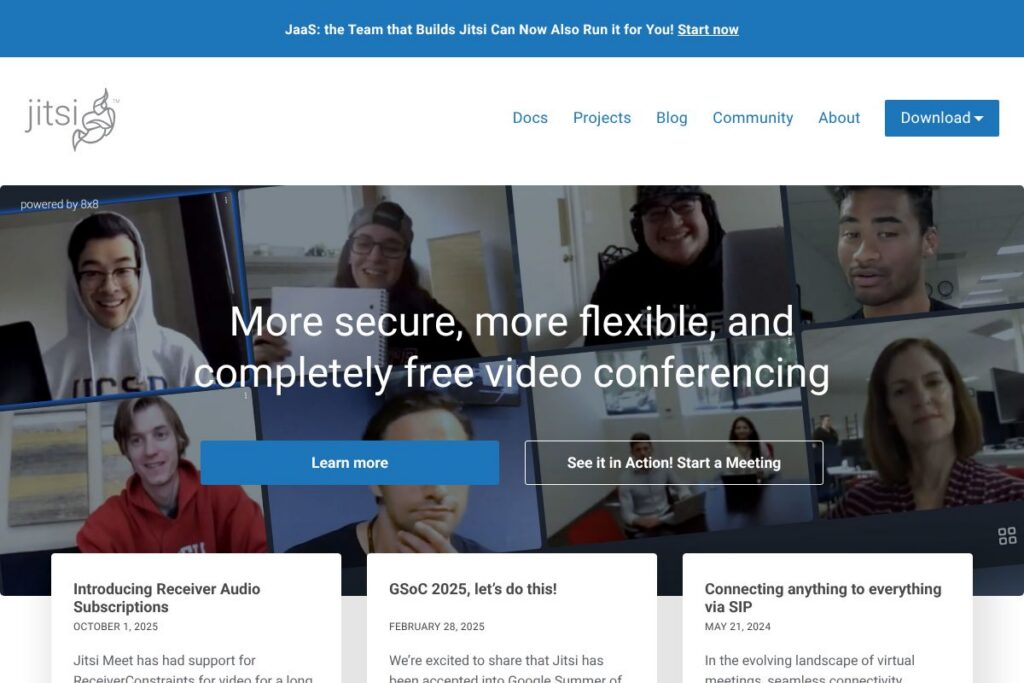
Jitsi is a collection of open-source projects that provide video conferencing, voice, and instant messaging for web and mobile. The core offering, Jitsi Meet, runs in a browser or mobile app with no account required, and the project includes media servers and SDKs for custom deployments.
Compared with commercial services such as Zoom, Microsoft Teams, and Google Meet, Jitsi emphasizes self-hosting, privacy, and protocol-level openness. Where Zoom and Teams provide fully managed, feature-rich SaaS platforms with tiered limits and built-in enterprise integrations, Jitsi gives teams full control over deployment and media routing at the cost of needing to manage infrastructure. For organizations that want to avoid vendor lock-in or host meetings on-premises, Jitsi offers a substantially different tradeoff.
Jitsi does video and audio conferencing well, and it is especially suitable for developers, education providers, and privacy-conscious organizations that need a customizable meeting stack. Its strengths are its open-source licensing, the ability to run on your own servers, and a modular architecture that covers both simple hosted meetings and advanced, integrated conferencing solutions.
How Jitsi Works
Jitsi Meet uses WebRTC for real-time media and routes video through a selective forwarding unit called Jitsi Videobridge to scale multi-party calls. In a typical deployment, clients connect to a conference manager that negotiates sessions and then send audio and video to the Videobridge for selective forwarding to other participants.
Teams can run a single-server installation for small groups or scale with multiple Videobridge instances behind a load balancer for larger deployments. For quick use, Jitsi operates a public instance at meet.jit.si that requires no setup; for production use, administrators install the Jitsi stack on their infrastructure and tune NAT, TURN server settings, and media transport for reliability.
Developers integrate Jitsi into applications using the iframe-based Jitsi Meet API or platform-specific SDKs, enabling custom meeting UIs, authentication, and automated room creation as part of existing workflows.
Jitsi features
The Jitsi platform focuses on core conferencing capabilities plus deployment flexibility and developer tooling. Core features include browser-based meetings, mobile apps, self-hosting options, developer APIs and SDKs, end-to-end or federated security options, recording and streaming, and SIP interoperability. The project continues to add capabilities via its blog and release notes.
Let’s talk Jitsi’s Features
Browser-based meetings
Jitsi Meet runs entirely in modern browsers without plugins, letting participants join with a single URL and optional password protection. This makes ad-hoc meetings fast to start for remote teams, classrooms, and community groups while preserving basic access controls.
Self-hosting and deployment
You can deploy the full Jitsi stack on Linux servers or cloud infrastructure, configuring components like Jitsi Videobridge, Prosody (XMPP), and Jigasi for SIP. Self-hosting gives administrators control over data residency, meeting retention, and custom scaling strategies; see the official installation handbook for deployment options.
Security and privacy controls
Jitsi supports password-protected rooms, lobby mode via authentication plugins, and encryption for media transported over WebRTC. For organizations that require hosted privacy, self-hosting eliminates third-party storage of signaling metadata and gives full control over logging and retention policies.
Recording and live streaming
Meetings can be recorded using Jibri for server-side recording and streamed directly to platforms such as YouTube. Jibri runs as a separate service that captures conference media, so administrators can provide recording or live-streaming features for public events or compliance needs.
Developer APIs and SDKs
Jitsi offers an iframe API for embedding meetings and client SDKs for Android and iOS, plus a collection of GitHub repositories for deeper customization. These tools let developers build custom meeting experiences, automate room creation, or embed conferencing into existing web and mobile apps; consult the Jitsi Meet API documentation for integration details.
SIP and legacy system interoperability
Jigasi provides SIP gateway functionality so participants can join from PSTN phones, softphones, or legacy video systems. This makes Jitsi adaptable for organizations that still rely on traditional telephony or need to bridge external conference systems.
With these features, Jitsi covers the typical needs of real-time meetings, from simple browser calls to integrated, self-hosted conferencing for teams and institutions.
Jitsi pricing
Jitsi is distributed as open-source software and is free to download, modify, and run on your own servers. That model removes licensing fees for the software itself and lets organizations scale based on their infrastructure and operational costs rather than per-seat subscriptions.
For users who prefer a hosted option, Jitsi operates a free public instance at meet.jit.si for ad-hoc calls, and commercial providers such as 8×8 offer managed Jitsi-based services with paid support and SLAs. For details on hosted or commercial offerings, review Jitsi’s download and deployment pages or the offerings from managed providers.
What is Jitsi Used For?
Jitsi is commonly used for remote meetings, online classes, virtual office hours, and public town-halls where participants join from a browser or mobile device. Its single-URL meetings and optional authentication make it straightforward for teachers, non-profits, and small teams to run recurring sessions with minimal setup.
Organizations also use Jitsi as a building block for custom conferencing products, embedding the meeting UI into customer portals or mobile apps, or linking into telephony systems via SIP for hybrid deployments. Enterprises with strict data control requirements deploy Jitsi on-premises to keep media and signaling within their network.
Pros and Cons of Jitsi
Pros
- Open-source and free: Jitsi’s codebase is freely available, allowing inspection, modification, and self-hosting without licensing costs.
- Flexible deployment: You can run a simple hosted instance for small teams or scale with multiple Videobridge servers for larger deployments, and the architecture supports cloud or on-premises environments.
- Developer-friendly APIs: The iframe API and mobile SDKs let developers embed meetings, customize the UI, and automate conference workflows within existing apps.
- SIP interoperability: Built-in SIP gateways enable connections from PSTN phones, hardware endpoints, and other conferencing systems.
Cons
- Operational overhead for self-hosting: Running your own Jitsi servers requires sysadmin work, configuration of TURN/STUN, and capacity planning to maintain call quality under load.
- Feature parity with large SaaS vendors: Out of the box, Jitsi lacks some advanced enterprise features such as integrated calendaring, extensive analytics, or enterprise-grade user management that come standard with paid platforms.
- Scaling requires engineering: Large deployments need careful tuning and additional components like scalable TURN infrastructure to ensure reliability for high-concurrency meetings.
Is Jitsi Free to Try?
Jitsi is free and open-source. You can use the public hosted instance at meet.jit.si for immediate, no-account meetings, or download the software to run on your own servers from the official downloads page with no licensing fees.
Jitsi API and Integrations
Jitsi provides an iframe-based Jitsi Meet API for embedding and controlling meetings from web pages, as well as client libraries and SDKs for Android and iOS. The Jitsi Meet API documentation and the broader Jitsi GitHub organization host implementation examples, configuration guides, and SDK source code.
Integrations commonly include single sign-on via OAuth or JWT, bridges to SIP endpoints via Jigasi, and optional connectors for recording and streaming with Jibri. These integration points let development teams connect Jitsi to existing identity systems, learning platforms, or telephony infrastructure.
10 Jitsi alternatives
Paid alternatives to Jitsi
- Zoom — A widely used freemium conferencing platform with extensive features for large meetings, webinars, and enterprise administration.
- Microsoft Teams — A collaboration suite that integrates chat, file sharing, and meetings tightly with Microsoft 365 services.
- Google Meet — Google’s browser-based video conferencing integrated with Google Workspace and calendar workflows.
- Cisco Webex — An enterprise-grade conferencing solution with advanced security, meeting controls, and hardware ecosystem support.
- BlueJeans — A conferencing service focused on interoperability and enterprise integrations.
- GoTo Meeting — A longstanding conferencing tool emphasizing reliability and business features.
Open source alternatives to Jitsi
- BigBlueButton — An open-source web conferencing system built for online learning with integrated whiteboard, polling, and breakout rooms.
- OpenVidu — A framework for building WebRTC-based video applications with server-side media control and recording capabilities.
- Nextcloud Talk — Part of Nextcloud’s suite, providing self-hosted audio/video chat tightly integrated with file sharing and collaboration.
- Janus Gateway — A general-purpose WebRTC server that developers use to build custom media applications and conferencing solutions.
- Kurento — A media server framework for advanced media processing and custom video workflows.
Frequently asked questions about Jitsi
What is Jitsi used for?
Jitsi is used for video and audio conferencing, chat, and embedding meetings into web and mobile apps. It is popular for self-hosted meetings, education, and custom-integrated conferencing solutions.
Does Jitsi offer a hosted meeting service?
Yes, Jitsi operates a free public instance at meet.jit.si for ad-hoc meetings. Organizations that need managed services can also choose third-party providers who offer commercial Jitsi hosting and support.
Can Jitsi be embedded into other applications?
Yes, Jitsi provides an iframe API and mobile SDKs for embedding meetings. Developers can customize the meeting UI, control conference behavior, and integrate authentication using the documented APIs.
Is Jitsi secure for business meetings?
Jitsi supports encrypted WebRTC media and access controls such as room passwords and authenticated deployments. For higher assurance, self-hosting allows organizations to control data residency, logging, and encryption end points.
Does Jitsi integrate with PSTN or SIP systems?
Yes, Jitsi offers SIP gateway functionality via Jigasi, enabling PSTN phones and SIP endpoints to join meetings. This makes it suitable for hybrid environments where participants may use legacy telephony.
Final verdict: Jitsi
Jitsi is a practical choice when you need flexible, privacy-respecting video conferencing that you can control and modify. It is strongest when used by teams that can operate their own servers or by developers embedding a meeting experience into other products, since it removes vendor constraints and allows protocol-level interoperability.
Compared with a competitor like Zoom, which uses a freemium model and offers packaged enterprise features and support, Jitsi is free to run but shifts operational responsibility to the deploying organization. For teams that prefer a managed SaaS experience with built-in user management and advanced administration, a paid platform may be easier to operate; for those prioritizing openness, self-hosting, or integration, Jitsi is a solid, production-capable option with active developer resources and community support.