Live Helper Chat: An Overview
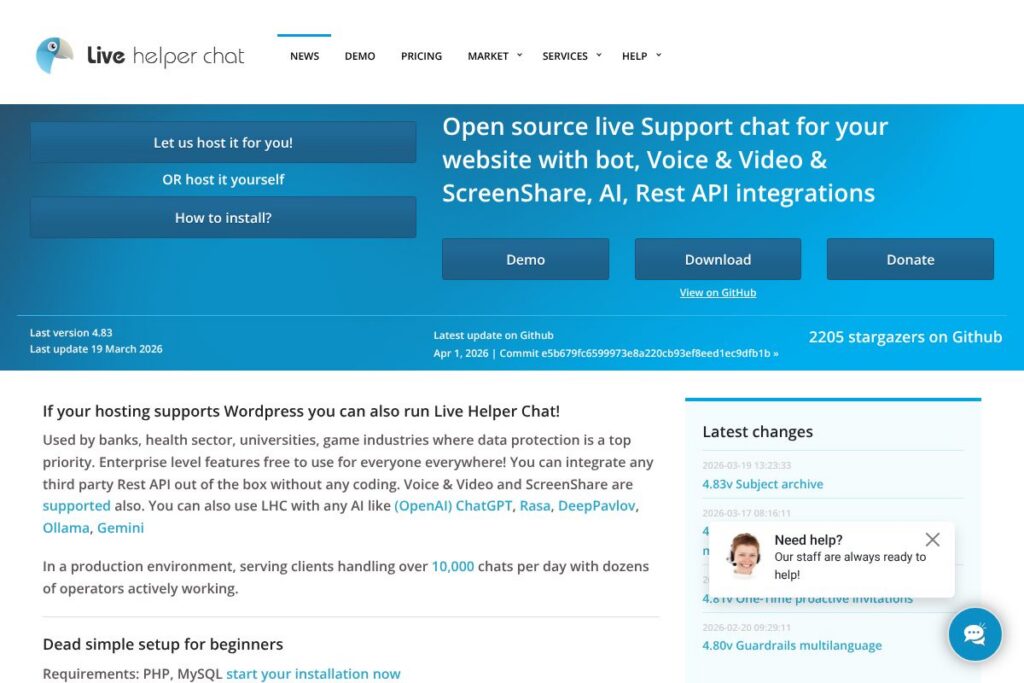
Live Helper Chat is an open-source live support system designed to run on your own infrastructure and provide real-time customer conversations through web, mobile, and desktop clients. It bundles a web widget, operator consoles, bot framework, voice and video calling, and screen sharing so teams can handle chats and richer interactions without a hosted SaaS dependency. The project includes connectors for Telegram, Twilio (WhatsApp), Facebook Messenger, and a REST API for custom integrations.
Compared with commercial hosted platforms like Intercom, Zendesk, and LiveChat, Live Helper Chat prioritizes self-hosting and data ownership rather than a fully managed cloud service. Unlike those proprietary solutions, Live Helper Chat can be extended with any third-party REST API without coding, and it supports direct AI integrations with services such as OpenAI, Rasa, DeepPavlov, Ollama, and Gemini. All of this makes it a practical choice for organizations that must keep data on-premises or maintain strict regulatory controls.
All of this makes Live Helper Chat especially suitable for banks, healthcare providers, universities, and gaming companies where data protection and privacy are central concerns. It scales to production environments handling thousands of daily chats with dozens of operators, while still offering a dead-simple setup path for smaller sites.
How Live Helper Chat Works
Live Helper Chat installs on a PHP/MySQL stack and serves a chat widget that you embed on web pages. Visitors initiate chats through the widget and requests are routed to operator consoles on web, desktop, or mobile apps; operators can escalate to voice, video, or screen sharing during a session.
Bots sit in front of operator queues to handle FAQs, route conversations, or collect structured information; bots and operators can call external services via the built-in REST API to enrich conversations or fetch user data. For higher scale and optional features, you can add components like Elastic Search, Node.js workers, and Amazon S3 for media storage.
Live Helper Chat features
Live Helper Chat groups text chat, automation, and richer communication channels into a single platform. Core capabilities include live chat widgets, bot automation, voice/video calls, screen sharing, multi-channel routing, REST API connectivity, and client apps for web, mobile, and desktop. The project also emphasizes privacy and can be deployed to meet regulatory requirements.
Let’s talk Live Helper Chat’s Features
Live chat widget
The embeddable widget supports real-time messaging, visitor tracking, custom forms, and proactive invitations. It adapts to mobile and desktop browsers and can be themed to match your site, giving agents contextual details about the visitor and previous conversations.
Bot framework and automation
Built-in bot support lets you automate responses, qualify leads, and route conversations to the right department. Bots can call external REST APIs for lookups or execute follow-up actions, reducing operator load and speeding first response times.
Voice and video calling
Voice and video are native features so agents can upgrade a chat session to an audio or video call without leaving the operator console. This is useful for guided support, live troubleshooting, or sensitive conversations that benefit from real-time voice.
Screen sharing
Screen sharing allows agents to view or guide a visitor’s screen during a session for complex troubleshooting or demonstrations. The feature integrates with the chat session so transcripts and session metadata remain attached to the ticket.
Multi-channel integrations
Out-of-the-box connectors include Telegram, Twilio for WhatsApp, and Facebook Messenger, with the REST API enabling additional channels. Messages from these channels route into the same operator queues so teams manage all conversations from a single interface.
REST API and extensibility
The REST API provides endpoints for creating chats, sending messages, managing users, and fetching conversation history. This makes it straightforward to plug Live Helper Chat into CRMs, identity systems, or bespoke backend services without deep engineering work.
Clients and deployment options
There are web, mobile, and desktop operator clients; mobile setup documentation is available for teams that need on-the-go access. Self-hosting on PHP/MySQL is simple for beginners, while optional components like Elastic Search and Amazon S3 support enterprise scaling and archival.
Security and compliance features
Designed for data-sensitive environments, it supports on-premises deployments so organizations retain control over logs and PII. Enterprise features such as role-based access, encrypted storage for attachments, and audit logs make it suitable for regulated sectors.
With these capabilities, Live Helper Chat brings live conversational channels and automation together in a package that balances out-of-the-box features with extensibility for larger deployments.
Live Helper Chat pricing
Live Helper Chat uses an open-source distribution model rather than a hosted subscription. The software itself is free to download and self-host, with enterprise-grade features included in the project so organizations can run a production-grade system without per-seat licensing fees.
Optional costs can appear if you choose managed hosting, commercial support, or third-party services for scale such as Amazon S3 for media, Elastic Search for indexing, or a managed database. For downloads, installation guides, and hosting options see the project homepage and the GitHub repository with installation files.
What is Live Helper Chat Used For?
Live Helper Chat is commonly used for customer support, technical troubleshooting, and secure client communications where keeping data under organizational control is required. Typical workflows include initial bot intake, operator handoff, and escalation to voice or video with session recording for compliance.
Organizations deploy it for multi-channel customer service, internal IT support desks, telehealth intake, university student services, and game support teams where account security and rapid, context-rich assistance are necessary. Its extensibility also makes it useful for lead qualification and CRM-driven conversational workflows.
Pros and Cons of Live Helper Chat
Pros
- Self-hosted and privacy-first: Deployments keep data in your infrastructure which helps satisfy regulatory or internal data protection requirements. This makes the tool attractive to banks, healthcare organizations, and universities where data residency matters.
- Feature-rich open source: Enterprise-grade capabilities such as voice, video, screen sharing, and bot automation are available without mandatory licensing fees. Teams can access advanced functionality while avoiding per-seat SaaS costs.
- Multi-channel routing: Integration with Telegram, Twilio (WhatsApp), and Facebook Messenger centralizes messaging channels for unified queues. The REST API further enables connection to CRMs and external services.
- AI-friendly architecture: Direct integrations with AI platforms like OpenAI or Rasa let teams add automated drafting, intent detection, or conversational assistants without replacing the platform.
Cons
- Self-hosting overhead: Organizations must provide infrastructure and operations for availability, backups, and scaling which increases operational work compared to hosted services. Large-scale deployments typically require additional components like Elastic Search or Node.js workers.
- No centralized hosted SLA by default: Because the core distribution is self-hosted, there is no built-in SLA unless you purchase managed services or commercial support from third parties. That places responsibility for uptime and security on the operator.
- Setup complexity for advanced features: Voice, video, and high-throughput environments need extra components and configuration; teams should plan for integration and testing before going live.
Does Live Helper Chat Offer a Free Trial?
Live Helper Chat offers a free, open-source version that you can self-host without licensing fees. The project includes enterprise-grade features at no cost, and documentation covers installation on PHP/MySQL stacks; for managed hosting or commercial support options consult the project homepage.
Live Helper Chat API and Integrations
The platform exposes a REST API for messaging, user management, chat history, and webhook events; the API documentation describes endpoints and example calls. Native connectors include Telegram, Twilio (WhatsApp), and Facebook Messenger, and the API makes it straightforward to add additional channels or CRM integrations.
Live Helper Chat also integrates with external AI platforms and can be configured to route bot logic to OpenAI, Rasa, DeepPavlov, Ollama, Gemini, or other NLP engines for automated responses and intent processing.
10 Live Helper Chat alternatives
Paid alternatives to Live Helper Chat
- Intercom – A hosted conversational platform focused on product messaging and customer engagement with built-in analytics and paid plans. Useful if you prefer a managed SaaS experience with native marketing features.
- Zendesk – A broader customer service suite offering chat, ticketing, and help center workflows; it is a commercial product better suited for organizations that want an integrated support stack.
- LiveChat – A dedicated hosted chat product with agent tools, apps, and integrations; the emphasis is on quick deployment and third-party integrations.
- Drift – A conversational marketing and sales-focused platform that combines chat, bots, and meeting scheduling in a hosted service.
- Freshchat – Part of the Freshworks suite, Freshchat is a hosted messaging platform with omnichannel routing and automation for customer engagement.
Open source alternatives to Live Helper Chat
- Chatwoot – An open-source customer engagement suite with multi-channel inbox, automation, and team collaboration features. Good for teams that want an open, self-hosted inbox with modern UI.
- Mibew Messenger – A lightweight open-source live chat written in PHP focused on simple chat functionality and easy self-hosting. Best for low-overhead deployments.
- Rocket.Chat – Primarily a team chat platform, Rocket.Chat can be configured for customer interactions and offers voice/video; it is a broader communication platform for internal and external conversations.
- Zammad – An open-source helpdesk with ticketing and chat integrations; suited for teams that want support workflows combined with chat functionality.
Frequently asked questions about Live Helper Chat
What platforms does Live Helper Chat support?
Live Helper Chat supports web, mobile, and desktop clients. The solution provides an embeddable web widget, operator web consoles, and mobile/desktop apps with setup documentation available on the project site.
Does Live Helper Chat integrate with WhatsApp and Telegram?
Yes, Live Helper Chat provides native integrations for Telegram and Twilio which can be used for WhatsApp. Those channels route messages into the same operator queues alongside Facebook Messenger and custom REST integrations.
Can Live Helper Chat be used with AI like ChatGPT?
Yes, Live Helper Chat can integrate with AI platforms such as OpenAI, Rasa, DeepPavlov, Ollama, and Gemini. Bots or middleware can call those models to generate replies, classify intents, or assist operators with suggested responses.
Is Live Helper Chat suitable for regulated industries like banking and healthcare?
Yes, Live Helper Chat is widely used by banks, healthcare organizations, and universities because it supports on-premises deployments and strong data control. Enterprise features and logging make it easier to meet compliance and audit requirements when properly configured.
How do I scale Live Helper Chat for high traffic?
Scaling is achieved by adding optional components such as Elastic Search, Node.js workers, and external object storage. Production deployments handling thousands of chats typically run the core PHP/MySQL stack behind load balancers and add indexing and media services for performance.
Final verdict: Live Helper Chat
Live Helper Chat is a comprehensive open-source support platform that combines chat, bot automation, voice, video, and screen sharing in a self-hosted package. It does particularly well for organizations that require data control, regulatory compliance, and the ability to customize integrations without vendor lock-in. The inclusion of enterprise-grade features in the open distribution lowers the barrier for teams that need advanced capabilities without per-seat licensing.
Compared with a commercial alternative such as Intercom, which is a proprietary hosted service with subscription-based pricing, Live Helper Chat offers the fundamental advantage of free self-hosting and extensibility; Intercom provides a managed experience with built-in analytics and support at a recurring cost. If your priority is ownership, privacy, and customization, Live Helper Chat is a strong candidate; if you prefer a hands-off, fully managed SaaS with vendor SLAs, a commercial product may be more appropriate.