Minnit Chat: An Overview
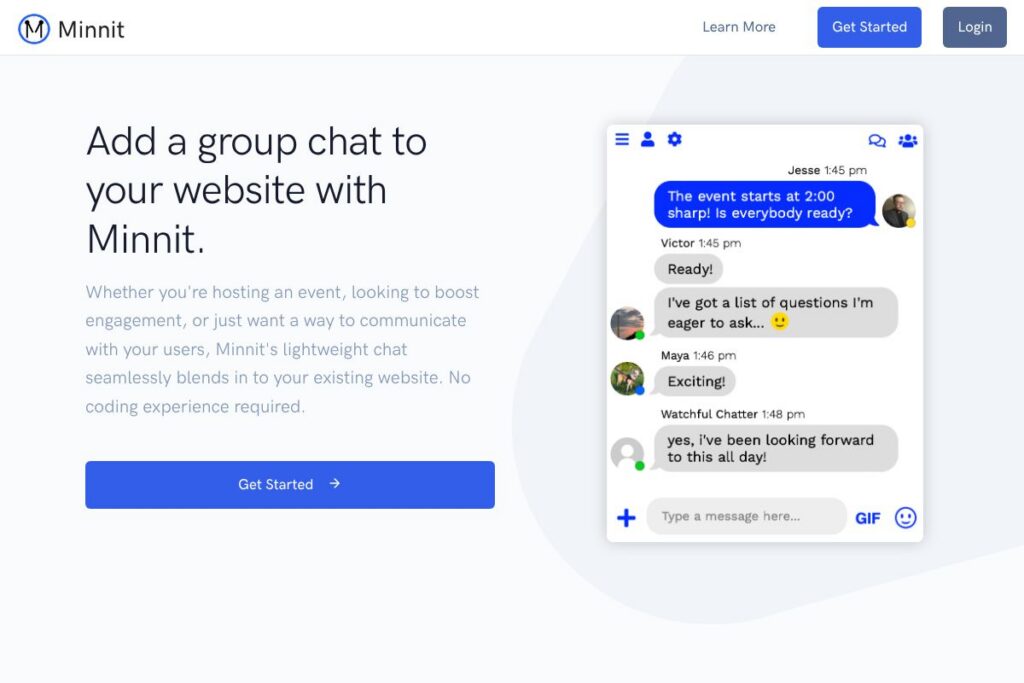
Minnit Chat is a cloud-hosted group chat you add to a website by copying a small snippet of code or by installing a plugin. It focuses on quick deployment, responsive embedding for desktop and mobile, and basic to advanced moderation controls so hosts can run moderated conversations for anything from blog posts to large livestreams.
Compared with Discord, Minnit Chat is designed to live directly on your site rather than in a separate app or server; this keeps traffic and engagement on your own pages. Compared with CometChat, Minnit Chat emphasizes easy embedding, WordPress integration, and a hosted backend, while CometChat prioritizes deep SDK customization and enterprise developer controls. Compared with site-focused solutions like Tawk.to, Minnit Chat puts more emphasis on group rooms, channels, and real-time public chat rather than one-to-one support messaging.
All of this makes Minnit Chat well suited to publishers, event hosts, and community managers who want a lightweight, embeddable group chat that can scale from dozens to thousands of concurrent participants while providing moderation and SSO options.
How Minnit Chat Works
Embedding Minnit Chat requires adding a short JavaScript snippet to your page or using the WordPress plugin so the chat loads inline or as a floating widget. Once embedded, the client connects to Minnit’s hosted backend to send and receive messages, presence updates, and moderation actions without exposing your own servers to real-time traffic.
Authentication can be left open for anonymous users or connected to your site using Single Sign On via OAuth2, SAML2, or WordPress user sync so visitors who are already signed into your site appear in chat with their existing identity. Moderation workflows run on the hosted service; moderators can ban users, approve messages, or configure automated filters and AI-powered moderation to remove offensive content.
Developers can use the SDK and API to receive events, send messages, build custom frontends, and trigger webhooks for external workflows, so integrating chat into custom apps or dashboards is straightforward.
Minnit Chat features
Minnit Chat bundles core group chat functionality with customization and moderation controls that suit both casual sites and larger events. Key capabilities include embeddable widgets, SSO, developer APIs, moderation tools, AI-assisted moderation, and media sharing. The platform also supports audio stream embedding and vanity subdomains for branding.
Embeddable widget
The chat widget is responsive and can be embedded inline, as a floating element, or alongside a livestream. This lets sites place chat next to videos, below posts, or on dedicated community pages while keeping visitors on-site.
Single Sign On (SSO)
SSO options include OAuth2, SAML2, and WordPress user sync, allowing users already logged into your site to join chat without creating a separate account; social sign-ins for Google, LinkedIn, Facebook, and X are also supported for reducing friction.
Customization and theming
You can change color schemes, upload background images, and apply custom CSS to match the chat to your site’s design. Vanity subdomains and the option to remove Minnit branding are also available for a more integrated appearance.
Moderation and safety tools
Set ranked roles such as Regulars, Moderators, and Managers, pre-screen messages for manual approval, appoint moderators, and configure automatic bans via a custom block list or Minnit’s AI-based offensive-message detection to keep conversations safe.
Notifications and presence
Hosts and moderators can receive notifications for new messages, direct messages, and moderation events; presence indicators show who is online and how many connected devices or tabs are active in a room.
Media, polls, and channels
Create separate channels for topics, allow image and file sharing, run polls inside chat, upload custom emoji and stickers, and export chat logs to CSV for moderation or archival purposes.
Audio stream integration
Add SHOUTcast, ICEcast, iHeartRadio, or TuneIn Radio streams so chat participants can listen to the same audio stream while chatting, useful for live shows or radio-style events.
SDK and API access
A JavaScript SDK and API provide client events, message sending, and webhook hooks so you can build a custom UI or connect chat events to other systems. The SDK supports common client-side events for connected, message, and presence states.
Minnit Chat’s biggest benefit is combining a quick embed workflow with moderation and SSO features suitable for public and private communities. You get a hosted backend, developer APIs, and visual customization without building real-time infrastructure yourself.
Minnit Chat pricing
Minnit Chat uses a tiered SaaS approach with plans tailored to site size and feature needs; pricing details are not listed on a dedicated public pricing page. For current plan tiers, usage limits, and options for removing branding or enabling enterprise features, see the Minnit Chat homepage where you can view current pricing options or contact sales for custom quotes.
What is Minnit Chat Used For?
Minnit Chat is commonly used to add real-time group chat to websites for livestreams, webinars, online classes, and community pages. Hosts use it to gather audience reactions in real time, run moderated Q&A sessions, or create a persistent community space attached to content.
It also works for internal or private events by enabling password-protected rooms, CAPTCHAs for signups, and SSO integration with existing user systems. Small publishers and event organizers benefit from the low setup overhead and moderation controls, while larger sites can scale rooms for thousands of concurrent viewers.
Pros and Cons of Minnit Chat
Pros
- Easy embedding and low setup overhead: Copying a small script or installing the WordPress plugin makes the chat available quickly without back-end development, ideal for non-technical teams.
- Robust moderation tools: Manual approval workflows, ranked moderator roles, and AI-assisted automatic bans help hosts manage large public chats effectively.
- SSO and identity integration: OAuth2, SAML2, and WordPress sync reduce account friction and maintain consistent user identity across site and chat.
- Developer-ready APIs: The SDK and API allow custom frontends, webhooks, and programmatic control over chat events for integration with analytics or CRM systems.
Cons
- Hosted dependency: As a cloud-hosted service, you rely on Minnit’s backend for uptime and data retention rather than self-hosting, which may be a constraint for teams needing full infrastructure control.
- Feature variance by plan: Some advanced features such as branding removal, vanity subdomains, or AI moderation may require higher tiers, so the full feature set can depend on plan selection.
- Limited native long-term analytics: For detailed analytics you may need to forward events via webhooks or export logs to integrate with external analytics tools.
Does Minnit Chat Offer a Free Trial?
Minnit Chat offers a free trial that lets you create a chatroom and try core features including embedding, moderation, and SSO during the trial period; you can sign up and start testing directly from the Minnit Chat homepage. After the trial, you can upgrade to a paid plan to unlock premium capabilities and higher concurrent-connection limits.
Minnit Chat API and Integrations
Minnit Chat provides a developer SDK and API for client events, message sends, and webhooks; the developer documentation outlines available endpoints, event payloads, and SDK usage examples. Use the API to build custom frontends, export messages programmatically, and receive webhook events for integration with external workflows.
Key integrations include WordPress user sync via the WordPress plugin, SSO through OAuth2 and SAML2, social sign-ins for Google, LinkedIn, Facebook, and X, and embedding audio streams from SHOUTcast or ICEcast. These integrations let you connect chat authentication and content to existing site systems.
10 Minnit Chat alternatives
Paid alternatives to Minnit Chat
- CometChat — A real-time chat platform with extensive SDKs, voice and video calls, and developer tools for custom in-app chat experiences.
- SendBird — Developer-focused chat and messaging APIs for large-scale apps, with advanced moderation, analytics, and omnichannel features.
- Crisp — A customer messaging platform that combines chat widgets, shared inboxes, and CRM features for websites and support teams.
- Tawk.to — A free-to-start live chat solution focused on customer support, with optional paid add-ons for advanced features and white-labeling.
- LiveChat — A feature-rich support chat focused on sales and customer service with routing, ticketing, and integrations with CRMs.
- Intercom — A broader customer messaging platform with chat, bots, and product messaging designed for customer engagement and support.
- Chatra — A website chat and messenger product that supports real-time group messaging and visitor tracking for small businesses.
Open source alternatives to Minnit Chat
- Rocket.Chat — A self-hosted chat platform with channels, direct messages, and federation options, suitable for teams that need full control over infrastructure.
- Element (Matrix) — A client for the Matrix protocol that supports room-based group chat, end-to-end encryption, and self-hosting via Matrix servers.
- Mattermost — An open source messaging platform with on-prem deployment options, suitable for internal team chat and collaboration.
- Chatwoot — An open source customer engagement suite offering chat widgets and inbox features for support teams who prefer self-hosting.
Frequently asked questions about Minnit Chat
What is Minnit Chat used for?
Minnit Chat is used to add real-time group chat to websites, livestreams, and online events. It helps hosts run moderated conversations, enable audience interaction, and keep engagement on their own pages.
Does Minnit Chat support Single Sign On?
Yes, Minnit Chat supports Single Sign On via OAuth2, SAML2, and WordPress user sync. This allows users to join chat using their existing site accounts or social sign-ins like Google or LinkedIn.
Can Minnit Chat be embedded on a WordPress site?
Yes, Minnit Chat can be embedded with a short script snippet or via its WordPress plugin. The plugin enables easier setup and synchronization with WordPress users for a seamless sign-in experience.
Does Minnit Chat offer developer APIs and an SDK?
Yes, Minnit Chat provides a JavaScript SDK and API for sending messages, receiving events, and connecting webhooks. Developers can use the developer documentation to build custom frontends or automation around chat events.
Is Minnit Chat suitable for large events with thousands of users?
Yes, Minnit Chat is designed to scale from small rooms to thousands of concurrent participants. Hosts can use moderation tools, message approval, and automated filters to manage high-volume chats effectively.
Final verdict: Minnit Chat
Minnit Chat is a practical choice for teams and publishers who need a quick-to-deploy, embeddable group chat that keeps conversations on their own site. Its strengths are easy embedding, SSO integration, and a hosted backend that removes the need to run real-time infrastructure while still offering developer APIs and moderation controls.
Compared with a platform like CometChat, Minnit Chat leans more toward rapid deployment and site-focused embedding while CometChat targets deep SDK-level integration and broader in-app messaging features; pricing approaches differ accordingly, with Minnit Chat organized around hosted plans for site owners and CometChat offering developer metered plans for app builders. If your priority is an on-page chat with simple setup, WordPress support, and effective moderation, Minnit Chat is a solid option to consider; for highly customized in-app chat at enterprise scale, evaluate dedicated developer platforms as an alternative.