What is My Live Chat
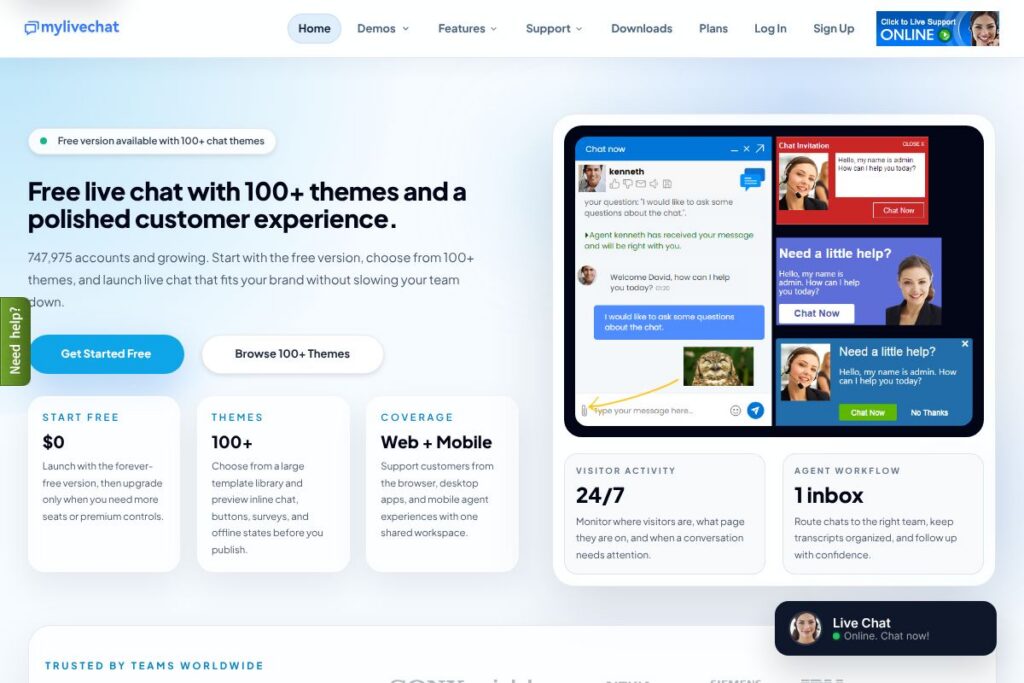
My Live Chat is a web-based live chat platform for websites that provides a forever-free plan plus paid upgrades for additional seats and controls. The product focuses on quick deployment, extensive template customization, and a single shared workspace for agents across browser, desktop, and mobile clients.
Compared with Intercom, My Live Chat prioritizes simplicity and cost control by offering a fully functional free tier and lightweight visitor monitoring rather than a sprawling customer messaging suite with built-in CRM. Against Zendesk, My Live Chat provides a narrower, chat-first experience instead of a full ticketing platform; teams that need tight integration with expansive support workflows may prefer Zendesk. Compared with Tawk.to, My Live Chat matches the free-tier mindset but emphasizes theme previews and inline template testing to speed widget design and brand alignment.
All of this makes My Live Chat well suited to websites and small teams that need a fast, branded chat presence without heavy upfront cost. It excels at deploying a polished chat widget quickly and offering designers a large set of templates to match brand styling while keeping agent workflows and visitor context centralized.
How My Live Chat Works
A small JavaScript snippet installs the widget onto any website, and admins configure sites, departments, and agent accounts from a central dashboard. You can preview any template inline by pasting a public URL, test placement and offline states, then publish the chosen theme to live sites.
Agents receive chats in a single shared inbox that supports routing, canned replies, and transcript history; the platform also surfaces real-time visitor activity so agents see which pages visitors are on and can trigger proactive invitations. Mobile and desktop agent apps connect to the same workspace so teams can respond from browsers, Windows/Mac apps, or iOS/Android devices.
My Live Chat’s main Features
The platform centers on quick widget deployment, extensive visual templates, real-time visitor intelligence, multi-channel agent access, and a JavaScript API for custom integrations. Core capabilities include 100+ previewable themes, proactive chat triggers, department routing, transcript storage, and developer hooks for custom data and analytics.
Visitor monitoring
Live visitor lists show who is online, which page a visitor is viewing, session duration, and basic behavior context before agents reply. This visibility helps sales and support teams prioritize high-intent sessions and start conversations with context rather than treating every chat as a cold contact.
Template library and preview
The template library contains more than 100 themes that you can preview in-context for chat button, pre-chat form, window style, offline message, and surveys. Designers can test placement and visual fit on a real page before publishing, which reduces iteration time and ensures the widget matches site branding.
Conversational support and routing
Built-in department routing, canned responses, and transcript history keep conversations organized as teams scale. Unlimited chats and consistent handoffs between agents reduce friction when multiple agents touch the same visitor or when agents need to escalate to specialized departments.
Multi-platform agent console
Agents can use the browser console or native Windows, Mac, iOS, and Android apps to handle conversations from anywhere. The shared workspace keeps conversation state in sync so agents switching devices retain context and transcripts remain centralized for follow-up.
Proactive chat and behavior triggers
Smart invitations and targeted engagement let teams auto-invite visitors based on page, time on page, or other behavioral signals. Proactive messages are useful for converting high-intent visitors on landing pages or for offering help on complex product pages.
Customization and API
The JavaScript API and widget styling options allow teams to brand the experience and pass custom data into chats for richer context. Integrations and custom data hooks make it possible to connect conversations to analytics, CRMs, or internal workflows.
Security and deployment options
Conversations use secure communication channels and the platform supports API controls to restrict access and manage integrations. Deployment requires only a small snippet of HTML, and there are on-premises options as an alternative for teams needing full self-hosting control.
With these features combined, My Live Chat helps teams respond faster with contextual conversations while preserving a strong on-brand experience for visitors.
My Live Chat pricing
My Live Chat uses a freemium subscription approach, with a forever-free plan for basic chat needs and paid upgrades available for additional seats, controls, and enterprise features. The vendor positions the free tier as a production-ready option and adds paid options for growing teams or those requiring advanced controls.
Monthly Billing:
Start Free – $0 (Forever-free chat widget, access to 100+ templates, single shared workspace, browser and mobile agent access).
Paid upgrades – Pricing for additional seats, premium controls, or advanced admin features is available as paid subscriptions, but the vendor does not list public per-seat prices on the site; contact sales to get month-to-month rates.
Annual Billing:
Annual billing options are typically offered for subscription upgrades and may provide lower effective costs for teams that commit annually. For exact monthly vs annual pricing and any volume discounts, see the official plans and upgrades page to view current options.
Enterprise
Enterprise – Custom pricing is available for large deployments, on-premises installations, and teams that require dedicated support, SLAs, or advanced security controls. Reach out to the vendor through the contact options listed on their site for tailored quotes.
What is My Live Chat Used For?
My Live Chat is used to add a visible, branded chat entry point on websites so visitors can connect with sales or support staff in real time. Typical uses include answering pre-purchase questions on landing pages, reducing bounce on high-intent product pages, and offering quick support for account or billing issues.
Small businesses and e-commerce sites use the free tier to capture leads and convert visitors, while support teams at larger organizations deploy the widget across multiple domains with department routing and transcript history to manage volume. Developers use the JavaScript API to attach session data or tie chat activity into analytics and CRM systems.
Pros and Cons of My Live Chat
Pros
- Forever-free tier: The free plan provides a production-ready chat widget and access to the template library without requiring a credit card, making it easy to test and launch quickly.
- Large template library: A library of more than 100 previewable themes simplifies matching the widget to site branding and testing placement before publishing.
- Simple deployment: A small HTML snippet installs the widget across sites, and the central dashboard manages agents, departments, and settings.
- Multi-platform agent access: Browser, native desktop, and mobile agent apps keep teams connected and maintain conversation context across devices.
- Developer-friendly API: A JavaScript API and custom data hooks let teams pass session data to chats and integrate with analytics and CRM workflows.
Cons
- Limited public pricing detail: Specific per-seat or tiered pricing is not published, so teams need to contact sales for exact costs as they scale beyond the free plan.
- Narrower scope than full support suites: My Live Chat focuses on chat and visitor intelligence rather than providing a full ticketing system and advanced workflows found in broader customer support platforms.
- Fewer built-in CRM features: Teams seeking deeply integrated CRM functionality may need to combine My Live Chat with external tools or custom integrations.
- Potential reliance on third-party hosting: Organizations that require strict on-premises deployment should evaluate the vendor’s on-premises product or enterprise options carefully.
Does My Live Chat Offer a Free Trial?
My Live Chat offers a free plan. The free tier is available forever and includes the chat widget, access to all 100+ templates for preview and publishing, visitor monitoring, and browser and mobile agent access; paid upgrades are optional when you need extra seats or enterprise features.
My Live Chat API and Integrations
The platform provides a JavaScript API for passing custom session data, controlling widget behavior, and hooking chat events into external systems; developers can consult the vendor’s developer resources linked from the site to get started. For integration scenarios, teams commonly connect chats to CRMs, analytics platforms, and ticketing systems to preserve context and follow-up workflows.
Key built-in integrations and extension points are surfaced through the dashboard and developer pages; teams should review the Developers API documentation for endpoint details and examples.
10 My Live Chat alternatives
Paid alternatives to My Live Chat
- Intercom — A broader customer messaging and engagement platform that includes chat, product tours, and CRM-like contact management for sales and support teams.
- Zendesk — A full support suite with chat, ticketing, and knowledge base tools designed for larger support operations that need advanced workflows and reporting.
- LiveChat — A dedicated chat vendor with a focus on enterprise features, integrations, and robust reporting for high-volume teams.
- Freshchat — Part of the Freshworks suite, offering chat, campaign messaging, and automation in a bundled support and sales toolset.
- Drift — A conversational marketing platform focused on sales-qualified conversations, routing, and meeting booking for B2B teams.
- HubSpot Live Chat — Included with HubSpot CRM, this ties chat conversations directly into contact records and marketing automation.
- Olark — Simple configurable chat with reporting and integrations for small to medium-sized businesses.
Open source alternatives to My Live Chat
- Chatwoot — An open source customer engagement platform that supports chat, omnichannel inboxes, and self-hosting for teams who prefer full control.
- Rocket.Chat — A broader open source chat platform that can be extended for customer-facing live chat and self-hosted collaboration.
- Mibew Messenger — A lightweight open source live chat solution designed to be self-hosted and integrated directly into websites.
- LiveHelperChat — An open source web chat application that supports visitor tracking, proactive invitations, and self-hosted deployments.
Frequently asked questions about My Live Chat
What is My Live Chat used for?
My Live Chat is used to add a branded live chat widget to websites for sales and support conversations. It helps teams start real-time conversations, monitor visitor activity, and capture leads without needing a complex setup.
Does My Live Chat have a free plan?
Yes, My Live Chat includes a forever-free plan. The free tier provides the chat widget, access to 100+ templates, visitor monitoring, and browser and mobile agent consoles.
Can My Live Chat integrate with CRMs and analytics?
Yes, My Live Chat can integrate using its JavaScript API and available hooks. Teams commonly forward chat context to CRMs and analytics tools via custom integrations or third-party connectors.
Is My Live Chat available on mobile for agents?
Yes, My Live Chat provides native iOS and Android apps in addition to browser and desktop clients. Agents can respond from mobile devices while maintaining a shared workspace and transcript history.
How do I preview templates in My Live Chat?
My Live Chat lets you preview templates inline by pasting a public URL into the preview tool. This shows the chat button, pre-chat form, chat window, offline state, and surveys on an actual page before you publish the widget.
Final verdict: My Live Chat
My Live Chat stands out as a practical choice for teams that need a low-friction, branded live chat presence and prefer to start on a free, production-ready plan. Its large template library and preview workflow reduce design friction, while real-time visitor monitoring and a shared inbox keep agent workflows simple and focused.
Compared with Intercom, My Live Chat offers a lower barrier to entry with a forever-free option and strong front-end customization, while Intercom provides deeper automation, CRM features, and product messaging at a higher price. For teams that need a lightweight, customizable chat widget and predictable scaling by seats or controls, My Live Chat is a strong, cost-conscious option.