What is OneSignal?
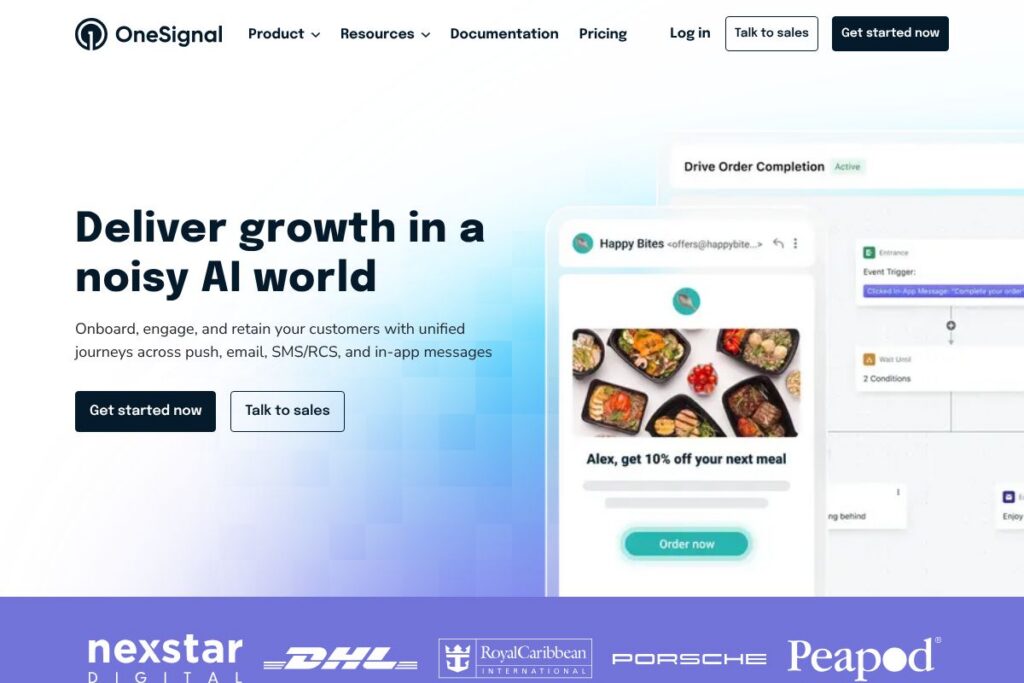
OneSignal is a customer engagement platform that centralizes messaging across mobile push, web push, email, SMS/RCS, and in-app messages. It focuses on lifecycle messaging and automated journeys that respond to user behavior, letting teams move from acquisition to activation, engagement, and retention without stitching multiple vendors together.
Compared with competitors such as Braze, Airship, and Firebase Cloud Messaging, OneSignal is positioned for wide adoption across sizes of businesses. Braze targets enterprise customers with advanced orchestration and deep analytics, Airship emphasizes enterprise mobile engagement and carrier relationships for SMS, and Firebase Cloud Messaging provides a developer-focused, free push transport but lacks built-in cross-channel lifecycle orchestration. OneSignal sits between these options by offering multi-channel orchestration with a developer-friendly integration surface and accessible onboarding.
OneSignal excels at rapid setup, multi-channel reach, and behavior-driven automation. It is a practical fit for mobile app publishers, e-commerce teams, gaming studios, and product-led companies that need to trigger messages when users take or omit specific actions, and to measure the revenue impact of those campaigns.
How OneSignal Works
Teams install OneSignal via platform SDKs or use server-side APIs to record events and user attributes. Events such as app_opened, item_purchased, or tutorial_completed feed into the platform, where they inform segmentation, triggers, and automated journeys.
From a central dashboard you create multi-step Journeys that send messages across preferred channels based on real-time behavior, delays, and conditional splits. Journeys can include welcome flows, reactivation paths, win-back sequences, and merchant notifications, all triggered by events or schedules.
Developers can send messages directly through the REST API or use the SDKs for Android, iOS, Flutter, React Native, Expo, and Unity to capture frontend events and display in-app messages. The platform captures delivery and engagement metrics that feed back into segmentation for continuous optimization.
What does OneSignal do?
OneSignal bundles the capabilities needed for lifecycle messaging into a single platform: channel delivery (push, email, SMS/RCS, in-app), automated Journeys, behavioral segmentation, templates and personalization, analytics, and developer APIs. Recent additions include richer AI prompts for message generation and expanded SDK support to reduce time-to-first-message.
The platform includes several powerful capabilities worth highlighting:
Multi-channel messaging
Send and coordinate mobile push, web push, email, SMS/RCS, and in-app messages from one orchestration hub. This allows consistent messaging across channels and reduces the need to manage delivery logic in multiple systems.
Journeys and automation
Build multi-step user journeys that react to events and user properties. Journeys can branch by behavior, wait for conditions, and execute channel-specific actions to guide users through activation, engagement, or reactivation flows.
Behavioral segmentation and triggers
Segment users using real-time events, lifetime value, last active time, or custom attributes. Event-driven triggers let you target users at the exact moment they show intent, increasing relevance and reducing noise.
Personalization and templates
Use attribute-based templates and dynamic content to personalize messages at scale. Templates support fallback values and channel-specific rendering so each recipient sees appropriate content whether in push, email, or SMS.
Analytics and revenue tracking
Track deliveries, opens, clicks, conversions, and revenue attribution for campaigns and journeys. Built-in analytics let teams measure the ROI of lifecycle messaging and iterate on strategies.
Developer SDKs and APIs
Client SDKs and a REST API enable fast integration, event ingestion, and message sending from servers or client apps. The SDKs include guides for Android, iOS, Flutter, React Native, Expo, and Unity to accelerate implementation; see the Android SDK AI prompt instructions, the iOS SDK AI prompt instructions, and other platform guides for integration examples.
Deliverability and scale
Designed to handle billions of messages per year, OneSignal focuses on high-throughput delivery across regions and channels, with features to manage segmentation size, throttling, and channel fallbacks when messages fail.
With these capabilities, the biggest benefit is simplifying lifecycle messaging: product and growth teams get faster time-to-value from event-driven campaigns that work across channels without managing separate vendors for push, email, and SMS.
OneSignal pricing
OneSignal uses a tiered SaaS pricing approach that scales with message volume, channels in use, and enterprise needs. Plans typically range from free or low-volume tiers for small apps to custom enterprise agreements for high-volume customers with advanced features.
For the most accurate, up-to-date plan details and any volume or enterprise pricing, see the OneSignal homepage where plan options and contact channels are listed. For help sizing usage and selecting a plan, you can also reach out to OneSignal sales from their site.
What is OneSignal Used For?
OneSignal is commonly used to onboard new users with multi-channel welcome sequences that push users to their first meaningful action. Teams use event-triggered welcome messages, in-app tutorials, and follow-up reminders to reduce time-to-value after install or signup.
It is also used to build long-term engagement and reactivation flows, such as behavioral triggers for abandoned carts, feature discovery nudges, subscription renewal reminders, and win-back campaigns for dormant users. Product teams use it to experiment with messaging tactics and measure the impact on retention and revenue.
Sectors that rely heavily on OneSignal include mobile gaming, fintech, e-commerce, publishing, and consumer apps that need real-time, personalized outreach across multiple channels.
Pros and Cons of OneSignal
Pros
- Omnichannel reach: OneSignal centralizes push, web push, email, SMS/RCS, and in-app messaging so teams can coordinate consistent campaigns across channels.
- High scalability: The platform is built to send very large volumes of messages and includes features to manage delivery performance and throttling at scale.
- Developer-friendly SDKs and API: SDKs for Android, iOS, Flutter, React Native, Expo, and Unity plus a REST API make it straightforward to capture events and trigger messages from apps or servers.
- Behavior-driven automation: Real-time event ingestion and Journeys enable targeted, timely messaging that responds to user intent rather than relying on scheduled blasts.
Cons
- Advanced features often require paid tiers: Some analytics, high-volume messaging, and enterprise capabilities fall behind paywalls, which may require upgrading for larger programs.
- Learning curve for complex Journeys: Building multi-branch Journeys and advanced segmentation can be complex for non-technical marketers without support from product or engineering.
- Carrier and regional SMS limitations: SMS and RCS deliverability depend on carrier relationships and regional regulations, which can complicate global SMS programs.
Does OneSignal Offer a Free Trial?
OneSignal offers a free plan and paid options. The free tier provides core push and web push capabilities to get started, while paid tiers add higher message volumes, multi-channel features like SMS and email at scale, advanced analytics, and enterprise support; contact OneSignal via the homepage contact options for trials or to discuss enterprise evaluation access.
OneSignal API and Integrations
OneSignal provides a public REST API for sending messages, managing devices, and importing events; the API documentation details endpoints, authentication, and examples. Client SDKs simplify event capture and message display on Android, iOS, Flutter, React Native, Expo, and Unity with platform-specific integration guides such as the Android SDK AI prompt instructions and the iOS SDK AI prompt instructions.
The platform connects with analytics and data tools to feed lifecycle orchestration, including integrations for CDPs, analytics systems, and e-commerce platforms; explore available integrations and connector options in the integration list when planning data flows.
10 OneSignal alternatives
Paid alternatives to OneSignal
- Braze — Enterprise-focused customer engagement with deep segmentation, advanced orchestration, and strong analytics for large teams.
- Airship — Mobile-first engagement and messaging with a focus on enterprise push and SMS carrier relationships.
- Iterable — Cross-channel growth marketing platform that emphasizes email and lifecycle orchestration across channels.
- Twilio — A communications platform offering SMS, voice, and email via programmable APIs, suited for teams that want granular control over messaging.
- SendGrid — Email delivery and transactional email platform with APIs and deliverability tools for email-focused programs.
- CleverTap — Behavioral analytics and engagement platform combining segmentation with campaigns and automated journeys.
- MoEngage — Customer engagement platform with AI-based insights, in-app messaging, and lifecycle orchestration.
Open source alternatives to OneSignal
- Mautic — Open source marketing automation for email, web, and some in-app workflows with self-hosted control over campaigns.
- Uniqush — An open source push notification gateway that lets teams self-host push delivery to multiple platforms.
- Apache Unomi — An open source customer data platform that supports event collection and segmentation for custom messaging stacks.
- Centrifugo — Self-hosted real-time messaging server that can be used to deliver in-app notifications and pub/sub events, requiring custom orchestration.
Frequently asked questions about OneSignal
What is OneSignal used for?
OneSignal is used for lifecycle messaging across push, email, SMS/RCS, and in-app channels. Teams use it to onboard users, build engagement flows, and run reactivation campaigns based on real-time behavior.
Does OneSignal have an API for sending messages?
Yes, OneSignal provides a public REST API for sending messages and managing devices. The API documentation includes endpoints, authentication examples, and payload formats.
Can OneSignal send SMS and email in addition to push?
Yes, OneSignal supports SMS/RCS and email along with mobile and web push and in-app messaging. These channels can be coordinated from the same Journeys and segmentation tools.
Is OneSignal suitable for high-volume messaging?
Yes, OneSignal is designed to handle very large message volumes and high throughput. The platform includes delivery controls and scaling features to manage large campaigns and concurrent sends.
How does OneSignal integrate with analytics and CDPs?
OneSignal integrates with common analytics and CDP tools to exchange events and user attributes. Integration options and connector guides are available through the platform documentation and the integration list.
Final Verdict: OneSignal
OneSignal is a practical, developer-friendly platform for teams that need multi-channel lifecycle messaging without integrating multiple point solutions. It performs particularly well at fast setup, event-driven Journeys, and delivering messages across push, email, and SMS from a single control plane.
Compared to Braze, OneSignal offers a more accessible entry point with a free tier and simpler SDK integrations, while Braze targets large enterprises with deeper analytics and feature sets at a higher price point. If your priority is fast integration, high-volume push delivery, and straightforward lifecycle automation, OneSignal is a solid choice; organizations that need enterprise-scale personalization and advanced analytics may evaluate Braze as a complementary or alternative solution.