PracticePanther: An Overview
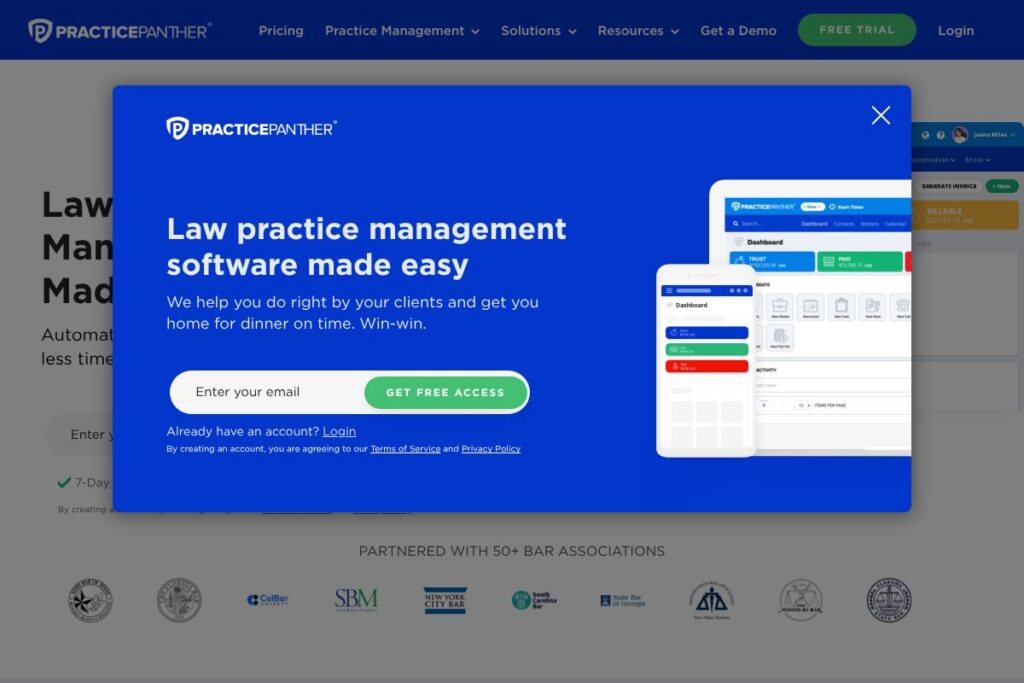
PracticePanther is a full-featured law practice management system designed to centralize case data, automate routine firm processes, and simplify billing and trust accounting. The platform bundles client intake forms, matter management, time and expense tracking, payments, document handling, and client communications into one interface aimed at law firms of varying sizes.
Compared with Clio, MyCase, and CosmoLex, PracticePanther places particular emphasis on built-in payments and workflow automation that reduce repetitive administrative work. Clio offers a broad integrations ecosystem and publicly listed per-user tiers, MyCase focuses on client-facing tools and usability for smaller firms, while CosmoLex highlights integrated trust accounting; PracticePanther competes by combining automated intake, payments, and task workflows in a single product.
PracticePanther is best suited for small to mid-size law firms and solo lawyers who need an all-in-one system to manage matters, billing, and client communications while reducing manual work. Its strengths are automated workflows, native payments via PantherPayments, and features that simplify trust accounting and reporting for firms that require compliant financial tracking.
How PracticePanther Works
PracticePanther organizes work around matters and contacts, with each matter acting as the central record for files, time entries, expenses, communications, and billing. Users create matters manually or automatically through intake forms, then attach tags, documents, timers, and tasks so all case activity is visible from the matter view.
Automation features let firms build conditional workflows that trigger tasks, calendar events, and reminders when a matter reaches a certain stage. For example, an intake form submission can create a new matter, assign intake tasks to staff, start a timer for an initial consult, and schedule follow-ups without manual handoffs.
Billing flows connect time and expense entries to invoice templates and payment options, so invoices can be created, sent, and paid online through PracticePanther’s payment service. Trust accounting tools and daily reconciliation features track retainer balances and help firms remain compliant with fiduciary requirements.
PracticePanther features
PracticePanther groups client management, billing, automation, and secure communication into a single platform. Core capabilities include automated client intake, workflow automation, time and expense tracking, built-in online payments with PantherPayments, trust accounting, document management, and reporting. Recent platform improvements emphasize deeper automation, simplified payment flows, and expanded client portal functionality.
What Makes PracticePanther Stand Out
PantherPayments
PantherPayments is the native payment option that lets firms accept credit cards, ACH, and eCheck, and to create payment plans and links. Built-in payments reduce friction in collections by putting payment options directly on invoices and client portals, while reporting ties receipts back to matters and accounts.
Client Intake Forms
Customizable intake forms let firms capture client information online and automatically create matters from submissions. Forms support conditional fields and custom tags so intake data maps directly to matter fields and triggers follow-up tasks for staff.
Workflows and Automation
Triggered workflows reduce repetitive administrative work by creating tasks, assigning owners, and setting deadlines when specified conditions are met. Conditional branching allows firms to model intake-to-engagement sequences and ensure consistent processing across similar matter types.
Time & Expense Tracking
Timers and manual time entries are available across web and mobile apps, with the ability to attribute entries to specific matters, tasks, or tags. Calendar events can be converted into time entries, and multi-timer support helps track overlapping work for accurate billing.
Trust Accounting
Trust accounting features support three-way reconciliations, threshold alerts, and clear separation between operating and trust funds. These tools are designed to help firms meet compliance requirements and reduce the risk of trust account errors.
Reporting and Tags
Custom tags and built-in reports help firms analyze revenue, expenses, outstanding invoices, and staff productivity. Reporting can be used to produce client statements, track aging receivables, and monitor matter profitability.
Document Management & Batch Creation
Cloud storage, document templates, and batch document creation reduce repetitive drafting tasks and centralize case files. Documents can be attached to matters, shared via the client portal, and versioned for auditability.
Secure Client Portal
The client portal provides a secure channel for clients to view matter status, download documents, review invoices, and pay online. Portal activity is logged in the matter timeline so staff retains a single view of client interactions.
Native eSignature
Built-in eSignature lets firms request and capture signatures on documents without a separate vendor. Signed documents are stored in the matter record and linked to billing or intake workflows where appropriate.
Two-Way Business Texting
Two-way business texting allows tracked SMS conversations between firm staff and clients, with the option to add time entries to conversations so billable communications are recorded. Texting provides a faster client touchpoint while keeping messages associated with the correct matter.
With these capabilities, PracticePanther aims to reduce administrative overhead, improve collections, and keep matter-related data organized in a single system. The biggest benefit is the combination of intake automation, payment processing, and workflows that let firms cut manual steps from day-to-day operations.
PracticePanther pricing
PracticePanther uses a subscription pricing model with multiple tiers and enterprise options tailored to different firm sizes and needs. Public per-user prices are not included here; the vendor commonly offers monthly and annual billing, with add-ons for payments and advanced features, and custom quotes for larger organizations.
For the most accurate and up-to-date information, see PracticePanther’s homepage and explore the options listed on PracticePanther’s website for current plan details and any available promotional offers. Contact sales through the site to request custom pricing for enterprise deployments and additional services.
What is PracticePanther Used For?
PracticePanther is used to manage legal matters from intake through billing and closure, consolidating contacts, documents, time tracking, and financials in one system. Firms use it to reduce manual data entry, maintain trust accounting compliance, and speed up invoicing and collections.
Typical users include solo attorneys, small law firms, and mid-size practices that need integrated billing, client intake, and task automation while retaining cloud access to case files and client communications. It is also used by firms that prioritize built-in payments and automated workflows over stitching together multiple niche tools.
Pros
- Automation of administrative tasks: PracticePanther’s workflows and intake forms reduce repetitive manual work and help standardize firm procedures.
- Integrated payments: PantherPayments and invoice-linked payment links simplify collections and shorten days sales outstanding by accepting cards and ACH within the platform.
- Trust accounting tools: Built-in reconciliation and threshold notifications assist firms in meeting trust account compliance requirements.
- Comprehensive matter view: Contacts, documents, time entries, billing history, and communications live in a single matter timeline for clearer case management.
Cons
- Learning curve for advanced automation: Complex workflows and conditional automation require careful setup, which may need administrator time or onboarding assistance.
- Customization limits for specialized practices: Firms with niche workflows or heavy integrations may need custom work or third-party tools to cover every unique process.
- Vendor-dependent payments and fees: Using the native payment option consolidates workflows but may introduce vendor fees and reconciliation practices that firms must evaluate.
Does PracticePanther Offer a Free Trial?
PracticePanther offers a 7-day free trial with no credit card required. The trial typically provides access to core features including client intake, matter management, time tracking, invoicing, and the client portal so firms can evaluate workflows and billing before committing to a subscription.
PracticePanther API and Integrations
PracticePanther provides built-in integrations with commonly used legal and business tools and offers developer access for custom connections. See the PracticePanther integrations page for a list of supported apps and instructions on connecting accounting, cloud storage, and calendar tools.
Popular integrations include accounting and payment services, cloud storage providers, and calendar sync options that let firms connect existing workflows to PracticePanther. For developer-oriented automation, review PracticePanther’s API documentation and integration details on their site to plan custom data flows and third-party connectors.
10 PracticePanther alternatives
Paid alternatives to PracticePanther
- Clio: A widely used law practice management platform noted for its integrations ecosystem and clear tiered plans suitable for small to enterprise firms.
- MyCase: Focused on ease of use and client communication, MyCase combines case management, billing, and a client portal with strong usability for smaller practices.
- CosmoLex: Emphasizes built-in trust accounting and integrated billing without the need for separate accounting software, targeting firms that require strict fiduciary controls.
- Rocket Matter: Offers robust billing and practice management features with a focus on timekeeping accuracy and productivity tools for law firms.
- Zola Suite: Combines practice management with integrated email and accounting features for firms looking for a single consolidated platform.
- LEAP: Provides matter management and legal forms integration with a strong presence in markets that require bundled document and practice templates.
- Smokeball: Designed for small law firms with automated time tracking and document automation to increase billing accuracy and productivity.
Open source alternatives to PracticePanther
- Casebox: An open source case and document management system that can be customized for legal workflows and client file organization.
- Odoo: A modular open source ERP that includes CRM, document management, and billing modules which firms can adapt into a legal practice stack.
- SuiteCRM: An open source CRM that can be extended with matter tracking and integrated with third-party document and billing systems for a low-cost custom solution.
- EspoCRM: A lightweight open source CRM that firms sometimes use as a base for building custom client intake and matter tracking workflows.
Frequently asked questions about PracticePanther
What is PracticePanther used for?
PracticePanther is used to manage legal matters, billing, client intake, and firm communications in a single cloud platform. Firms use it to centralize case files, automate routine tasks, and handle invoicing and payments from one system.
Does PracticePanther offer mobile apps?
Yes, PracticePanther provides mobile apps for time tracking, matter access, and communication. Mobile apps let attorneys track time, view matter details, and upload documents from phones and tablets while on the go.
Is PracticePanther cloud-based?
Yes, PracticePanther is a cloud-hosted platform with real-time cloud storage and backups. Cloud hosting enables remote access to matters, documents, and billing tools from any connected device.
How much does PracticePanther cost?
PracticePanther uses subscription plans and custom enterprise pricing based on firm size and required features. For current plan options and billing cycles, review PracticePanther’s website or contact their sales team for a tailored quote.
Can PracticePanther handle trust accounting?
Yes, PracticePanther includes trust accounting features that support daily reconciliations and retainer tracking. The platform helps firms separate trust and operating funds and provides alerts and reports to assist with compliance.
Final Verdict: PracticePanther
PracticePanther excels at consolidating intake, billing, and automation into a single platform that reduces administrative overhead for law firms. Its native payment capabilities, workflow automation, and trust accounting features make it a practical choice for firms that need integrated financial controls and simplified collections.
Compared with Clio, PracticePanther leans more heavily on built-in payment flows and automated intake-to-billing sequences, while Clio is known for a broader third-party app marketplace and clearly published per-user plans. Firms prioritizing embedded payments and workflow automation should evaluate PracticePanther alongside Clio, and review each vendor’s current plan offerings on their official sites to determine which aligns best with budget and required integrations.