Live Chat: An Overview
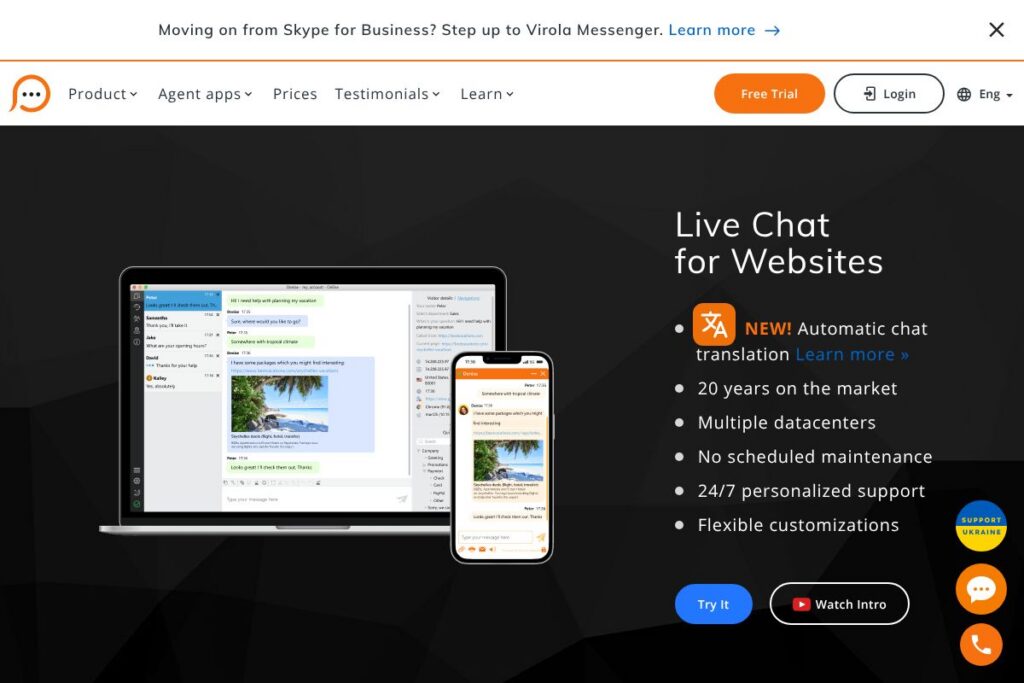
Live Chat is a hosted live chat solution for websites that focuses on fast setup, multi-platform agent apps, and a consistent feature set across plans. Core capabilities include a website chat widget, desktop and mobile agent apps, conversation transcripts, visitor monitoring, pre-chat surveys, and basic visitor filtering. The platform emphasizes high availability with multiple datacenters and 24/7 personalized support.
Compared with Intercom, Live Chat places more emphasis on straightforward chat features and per-agent scaling rather than marketing automation and product tours. Compared with Zendesk, Live Chat is simpler to deploy for small teams and includes the same feature set across plans rather than gating capabilities behind higher tiers. Compared with freemium tools like Tawk.to, Live Chat focuses on paid support, data encryption during transmission, and dedicated customer support.
All of this makes Live Chat a practical option for companies that want a reliable, easy-to-manage chat service for customer support and lead capture. It is especially well suited to small and mid-size businesses that need simple agent management, multi-domain support, and 24/7 vendor support.
How Live Chat Works
Agents sign up, install the agent app on Windows, Mac, Linux, iOS, or Android, or use the web app to log in and begin monitoring visitor activity. You add a small chat button snippet into your site template or CMS and customize the chat window appearance, pre-chat survey fields, and behavior such as automatic chat invitations and eye-catcher bubbles.
During a visitor session the system shows real-time visitor info and allows agents to start or receive chats, send canned responses, transfer conversations between agents, attach files and screenshots, and send chat transcripts to email. Administrators control agent profiles, allowed domains, IP blocking, chat management rules, and basic reporting from the account Control Panel.
What does Live Chat do?
Live Chat is organized around live visitor conversations and agent productivity features. The platform recently added automatic chat translation to help teams support multilingual customers. Other important capabilities include visitor monitoring, pre-chat forms, offline messaging, secure transmission of transcripts, and integrations with common CMSs and e-commerce platforms.
The platform includes features for message routing and load control so teams can handle many concurrent chats, automatic closing rules for abandoned sessions, and offline forms that forward messages to encrypted email. Administrators can customize the pre-chat survey, hide visitor data from transcripts for privacy, and enable secure connections by default.
Automatic chat translation
Automatic chat translation converts incoming and outgoing messages between visitor and agent languages in real time, allowing a single agent to handle multilingual conversations without switching tools. This reduces friction for global shops and improves response consistency across regions.
Cross-platform agent apps
Native apps for Windows, Mac, Linux, iOS, and Android let agents work from desktop or mobile devices while a web app provides full access in a browser. Desktop apps add features like screenshots, flexible notifications, and a Geo location tab while mobile apps focus on on-the-go chat handling and monitoring.
Live chat widget for your website
A lightweight JavaScript widget is added to site templates and supports unlimited domains at no extra cost. The widget is customizable in appearance, placement, and behavior and supports pre-chat surveys, offline forms, and eye-catcher bubbles to invite visitors into conversation.
Integrations and easy setup
Integrations and step-by-step integration tutorials make it straightforward to add the chat widget to platforms such as Magento, Shopify, Wix, WordPress, and Joomla. Setup is a sequence of creating an account, installing the agent app or web app, inserting the chat button code, and customizing the chat window.
Security and encryption
All new accounts enable a secure connection by default and chat transcripts and offline emails are transmitted via encryption to the customer mail server. The vendor does not retain unencrypted transcript copies on their servers during transmission, and administrators can add privacy consent fields and hide visitor data for regulatory compliance.
Reporting and analytics
Built-in statistics track agent performance, chat counts, pages where chats were initiated, and other session-level metrics useful for staffing and quality assurance. Reports can help identify high-traffic pages and agent response times for continuous improvement.
With these capabilities Live Chat gives teams the tools to respond to website visitors quickly, manage agent workload, and collect data for improving support quality.
Live Chat pricing
Live Chat uses a subscription pricing model based on the number of agent profiles in an account, with standard monthly and annual billing for small packages and enterprise plans for larger deployments. Plans are differentiated by agent seat counts rather than by feature access, since all features are included across payment plans.
Account tiers and billing
Monthly Billing: Live Chat offers standard monthly subscriptions for small teams and larger accounts, billed by the number of agent profiles in your plan.
Annual Billing: Annual plans are available and provide a lower effective monthly cost when prepaid for a year; enterprise contracts are handled directly with sales for large deployments and custom SLAs.
For precise plan names, seat options, and current rates, view the Live Chat account options or contact 24/7 support for a tailored quote and payment methods accepted.
What is Live Chat Used For?
Live Chat is commonly used for real-time customer support, lead qualification, and sales assistance on websites. Typical uses include answering product questions, resolving technical issues, routing support requests to specialists, and collecting visitor contact details when agents are offline.
Small and medium businesses use Live Chat to add a persistent communication channel without building custom infrastructure, while larger organizations leverage unlimited domain support, IP blocking, and enterprise arrangements to scale across multiple sites and regions.
Pros and Cons of Live Chat
Pros
- Simple multi-platform support: The same feature set is available through desktop, web, and mobile apps which makes it easy for agents to switch devices without losing functionality.
- All features in every plan: Unlike tiered competitors, feature availability does not change by plan; plans differ only by the number of agent profiles, which simplifies purchasing decisions.
- Secure transmission of transcripts: Chat transcripts and offline messages are sent via encryption to customer mail servers, and secure connections are enabled by default for new accounts.
- Multilingual coverage: Automatic chat translation and localization of the web and control panel in many languages help international teams support visitors across regions.
Cons
- No public pricing details: The vendor does not publish granular pricing for each seat tier online, so prospective buyers must contact sales or the account dashboard to see exact monthly and annual rates.
- Interface differences by platform: Some advanced features such as screenshots and geo-location are available only in desktop apps, so mobile-only agents have a reduced experience compared with desktop users.
- Limited built-in automation: The platform focuses on live conversations rather than advanced chatbot workflows and marketing automation found in more feature-heavy competitors.
Does Live Chat Offer a Free Trial?
Live Chat offers a free trial where all live chat features are available. During the trial you can create unlimited agent profiles, add the chat button to multiple domains, and test integrations; new customers also benefit from a 30-day money-back promise on their first payment if they are not satisfied.
Live Chat API and Integrations
Live Chat supports integrations with common CMS and e-commerce platforms and provides integration tutorials to guide setup for Magento, Shopify, Wix, WordPress, and Joomla. For developer access, account holders can consult the platform documentation and tutorials available in the Control Panel for webhook and integration details.
Key out-of-the-box connections include CRM and helpdesk integrations, email forwarding of transcripts, and simple domain-based filtering. Administrators can also implement IP blocking and region filters to control who can access the chat widget.
10 Live Chat alternatives
Paid alternatives to Live Chat
- Intercom — A customer messaging platform that combines live chat with in-app messaging, product tours, and basic automation for support and growth teams.
- Zendesk Support — Part of a larger helpdesk suite, Zendesk provides ticketing, live chat, and multi-channel support with extensive reporting and enterprise features.
- LiveChat — A widely used chat provider with a strong focus on integrations, reporting, and sales-focused chat features for ecommerce teams.
- Olark — A straightforward live chat tool with reporting and basic automation that is easy to deploy for small businesses.
- Freshdesk Messaging — Formerly Freshchat, it blends live chat with bot workflows and campaign messaging aimed at support and sales teams.
- Tidio — A chat platform that combines live chat and chatbots with easy integrations for small online stores.
Open source alternatives to Live Chat
- Live Helper Chat — An open source live chat solution you can self-host, with visitor tracking, multiple operators, and customization options.
- Mibew Messenger — A lightweight open source web chat application that you can install on your own server and integrate with site templates.
- Rocket.Chat — A broader open source team chat platform that can be extended with web widgets and used as a self-hosted support chat solution.
Frequently asked questions about Live Chat
What does Live Chat charge for additional agent profiles?
Live Chat charges by agent profiles rather than by feature tiers. You can add more agent profiles at any time during your billing period and the vendor will pro-rate the upgrade and start a new billing period from the upgrade date.
Is Live Chat secure for handling customer data?
Yes, Live Chat transmits chat transcripts and offline messages via encryption and enables secure connections by default. Administrators can add privacy consent fields to pre-chat surveys and hide visitor data from transcripts for compliance needs.
Can Live Chat be added to WordPress and Shopify sites?
Yes, the widget integrates with WordPress, Shopify, Magento, Wix, Joomla, and similar platforms. Integration tutorials and chat button codes are available in the account Control Panel to guide installation.
Does Live Chat offer 24/7 support?
Yes, Live Chat provides 24/7 personalized customer support and maintains multiple datacenters with no scheduled maintenance windows. The vendor also offers direct help through the live chat channel in your account.
What happens to accounts after the free trial expires?
Agent logins are locked after the free trial expires but account settings are preserved. You can reactivate the account at any time and restore agent access without losing configuration data.
Final verdict: Live Chat
Live Chat is a practical, no-nonsense live chat service that prioritizes ease of setup, consistent feature access across plans, and multi-platform agent support. Its strengths are a complete feature set included in every plan, encrypted transcript delivery, unlimited domains, and 24/7 vendor support which make it a good fit for businesses that need reliable real-time support without complex tier-based feature gating.
Compared with a competitor like Zendesk, Live Chat is simpler to adopt for small and mid-size teams because it does not lock essential chat features behind higher tiers; Zendesk typically structures features across subscription levels and charges per agent which can change the cost depending on required capabilities. For teams that want straightforward per-agent scaling and built-in multilingual support, Live Chat delivers a focused option at a modest operational overhead.