QuickBlox: An Overview
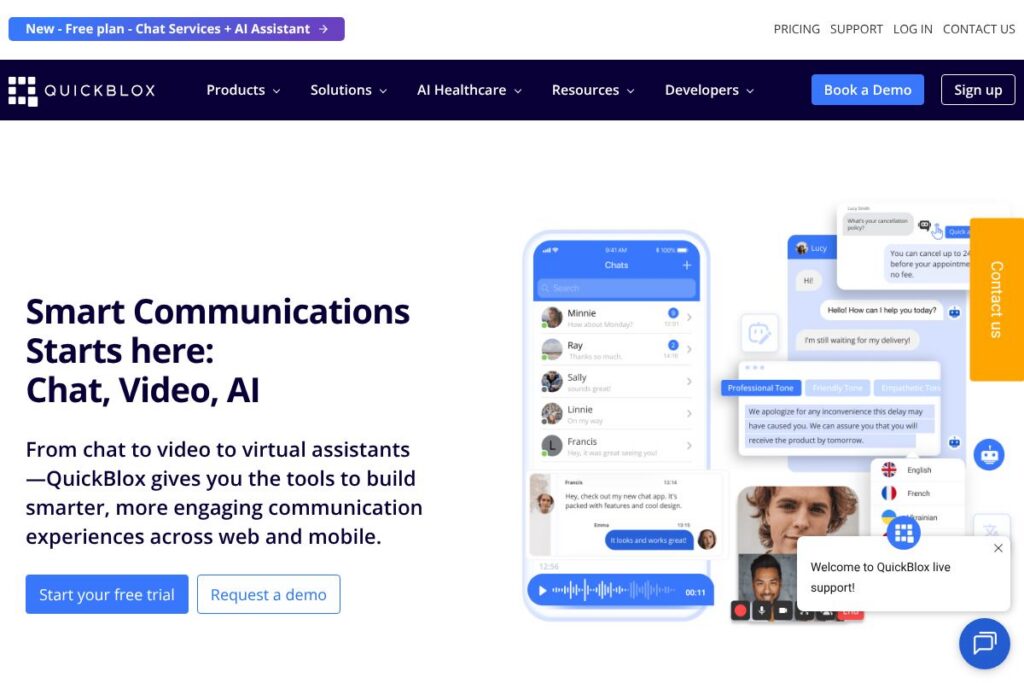
QuickBlox is a communications platform that provides APIs and SDKs for adding instant messaging, voice, and video calling to mobile and web applications. It includes client SDKs for iOS, Android, and JavaScript, pre-built UI Kits to accelerate development, and turnkey white-label solutions such as Q-Consultation for secure video consultations.
Compared with competitors, QuickBlox sits between low-level communications providers and full managed services. Unlike Twilio, which focuses on usage-based programmable communications and building blocks, QuickBlox supplies ready SDKs and UI Kits that reduce integration time. Compared with SendBird and Agora, QuickBlox emphasizes both messaging and integrated white-label consultation features along with on-premise and private cloud hosting options for regulated industries.
QuickBlox does well at delivering cross-platform SDKs, open UI components, and compliance-ready deployments, making it suitable for healthcare, finance, marketplaces, and any app that needs embedded real-time communication with options for customization and self-hosting.
How QuickBlox Works
QuickBlox exposes REST APIs and client SDKs that handle authentication, user sessions, messaging, presence, and voice and video calls over WebRTC. Developers initialize the SDK with application credentials, create sessions, sign in users, then connect to the chat service to send messages or establish calls using the provided signaling and media layers.
Typical workflows include server-side session creation for authenticated users, client SDK calls to connect to chat or call services, and optional use of the QuickBlox UI Kits to render dialogs, message lists, and calling interfaces. QuickBlox also supports server-side hooks and webhooks for event-driven integrations and can be deployed in shared cloud, private cloud, or on-premise for higher control and compliance.
QuickBlox features
QuickBlox combines core messaging and calling capabilities with developer tools and compliance features to support production apps in regulated industries. Core functionality covers one-to-one and group chat, real-time voice and video, file sharing, presence, push notifications, and extensibility through AI assistants and UI Kits.
Chat API and Messaging
The Chat API supports persistent one-to-one and group conversations, message history, attachments, typing indicators, and presence. It benefits teams by providing a complete message pipeline with moderation hooks and message storage options that integrate into client apps with minimal custom code.
Voice and Video Calling
Voice and video use WebRTC-based sessions for real-time media with signaling handled by QuickBlox. Developers can implement one-to-one and group calls, control media streams, and add features like hold, mute, and screen sharing where supported by the client SDKs.
AI Assistants and Message Tools
Built-in AI assistants provide automated replies, message rephrasing, and translation features that run against your workflows or data. These capabilities help reduce manual support load, improve response consistency, and enhance multilingual user experiences.
Q-Consultation White-Label Solution
Q-Consultation is a turnkey product for secure video consultations with appointment scheduling, virtual queues, waiting rooms, and provider and client sides pre-built. It accelerates deployment for telemedicine and professional consultation use cases while keeping the UI brandable and configurable.
UI Kits and Open Source Components
QuickBlox ships pre-built UI Kits for web and mobile that include chat screens, dialogs, and attachment handlers with integrated chat logic. Using the UI Kits reduces front-end work and accelerates time to market while remaining modifiable for custom branding.
Security, Compliance, and Hosting Options
The platform supports HIPAA-compliant deployments, SOC 2 level controls, and offers shared cloud, private cloud, and on-premise hosting. These options let organizations align deployment strategy with regulatory and data residency needs.
Developer Tools and Documentation
QuickBlox provides sample code, SDKs for Swift, Kotlin, JavaScript, Flutter, and React, plus step-by-step guides in the developer documentation. Clear SDK patterns and examples shorten onboarding for engineers and speed up integration cycles.
With these features, QuickBlox lets development teams add robust, compliant real-time communication quickly while retaining the option for deep customization and enterprise-grade deployment choices.
QuickBlox pricing
QuickBlox uses a flexible pricing model that supports free trials for initial evaluation and custom enterprise plans for production-scale deployments. The platform provides a free entry-level option and negotiable enterprise pricing tailored to seats, features, and hosting requirements.
Public and Trial Options
Basic Plan – Free for 3 months (core chat and calling features suitable for evaluation and small projects). For specific limits, feature availability, and current promotions, view the QuickBlox pricing and plans for the latest details.
Enterprise and Custom Pricing
Enterprise – Custom pricing (includes private cloud or on-premise hosting, SLAs, dedicated support, and compliance options). Larger deployments are priced based on user volumes, required features, hosting model, and support level; contact sales through the QuickBlox platform contact channels to discuss requirements and get a tailored quote.
What is QuickBlox Used For?
QuickBlox is commonly used to add in-app messaging, audio calls, and video consultations to consumer and enterprise applications without building the entire stack from scratch. Typical implementations include in-app customer support chat, user-to-user messaging in marketplaces, and live tutoring or coaching sessions with integrated video and chat.
Industry use cases include HIPAA-compliant telemedicine, secure advisor-client conversations in finance, buyer-seller communication for marketplaces, social networking features like group chat and media sharing, and live classrooms for education. The combination of SDKs, UI Kits, and deploy-anywhere hosting makes QuickBlox suitable for regulated and high-scale scenarios.
Pros and Cons of QuickBlox
Pros
- Cross-platform SDKs: The SDKs for iOS, Android, and web reduce duplicate work and shorten development cycles while ensuring consistent functionality across clients.
- Turnkey white-label options: Q-Consultation and pre-built UI Kits let teams launch consultations and messaging features rapidly without building UI and scheduling logic from scratch.
- Compliance and hosting flexibility: Support for HIPAA, SOC 2 controls, private cloud, and on-premise hosting helps regulated organizations meet data residency and security requirements.
- AI-assisted features: Built-in AI assistants for translation, rephrasing, and automated replies improve user experience and reduce support load.
Cons
- Custom pricing for enterprise: Pricing for production and large-scale deployments is custom, which requires sales engagement and can lengthen procurement cycles for small teams.
- Feature overlap with specialists: For teams that only need programmable voice or video, specialized providers such as Twilio or Agora may offer more granular usage pricing or specific advanced media features.
- Integration effort for bespoke UI: While UI Kits speed initial setup, deep customizations still require front-end development and integration work to match complex brand or workflow requirements.
Does QuickBlox Offer a Free Trial?
QuickBlox offers a free Basic Plan valid for 3 months that allows teams to test core chat and video calling capabilities. The Basic Plan is intended for evaluation and small pilots; for production or enterprise-level needs, you can contact sales to discuss extended trials or custom onboarding via the QuickBlox platform.
QuickBlox API and Integrations
QuickBlox provides a developer API and multiple client SDKs; the developer documentation describes REST endpoints, WebRTC signaling, and SDK initialization patterns. Refer to the QuickBlox developer documentation for API reference, authentication flows, and sample code.
The platform integrates with other services through webhooks and server-side connectors, and teams commonly connect QuickBlox to systems like Slack, Google Workspace, Salesforce, Zapier, and payments or logging services to extend workflows and automation.
10 QuickBlox alternatives
Paid alternatives to QuickBlox
- Twilio — Programmable communications with voice, video, and chat building blocks and usage-based billing, suitable for teams that prefer granular control over pricing and telephony features.
- SendBird — Managed chat and messaging platform with moderation, analytics, and omnichannel support aimed at customer-facing apps and marketplaces.
- Agora — Real-time voice and video SDKs focused on low-latency media, large-scale live streaming, and interactive broadcasting use cases.
- Vonage — Cloud communications APIs for voice, video, messaging, and verification with a broad set of telephony integrations.
- PubNub — Real-time messaging and data streaming platform optimized for presence, push updates, and scaled message routing.
- MessageBird — Omnichannel communications with programmable APIs for messaging and voice across global channels.
Open source alternatives to QuickBlox
- Matrix — An open standard for decentralized real-time communication with server implementations like Synapse and client libraries for messaging and VoIP.
- Rocket.Chat — An open source team chat platform that can be self-hosted and customized for internal or customer-facing messaging scenarios.
- Mattermost — Self-hosted messaging and collaboration platform designed for secure internal communications with plugin and API support.
- Jitsi — Open source video conferencing focused on WebRTC-based group video meetings, useful for teams that want a free, self-hosted media layer.
- Socket.IO — A low-level library for real-time bidirectional event-based communication, commonly used to implement custom chat systems when full platforms are not required.
Frequently asked questions about QuickBlox
What does QuickBlox do?
QuickBlox provides APIs and SDKs for embedding chat, voice, and video into apps. It also offers UI Kits, AI assistant features, and white-label solutions like Q-Consultation for secure video consultations.
Is QuickBlox HIPAA-compliant for healthcare apps?
Yes, QuickBlox supports HIPAA-compliant deployments. The platform offers private cloud and on-premise hosting options along with compliance controls suitable for telemedicine solutions.
Can QuickBlox scale to large user volumes?
QuickBlox is built to support enterprise-scale deployments. Hosting options, multi-tenancy capabilities, and performance tuning allow it to handle high request volumes across large user bases.
How do I integrate QuickBlox into my mobile or web app?
You integrate QuickBlox using their SDKs and APIs for iOS, Android, and JavaScript. The developer documentation includes initialization patterns, session creation, and sample projects to speed integration.
Does QuickBlox provide sample UI components for faster development?
Yes, QuickBlox offers open source UI Kits and pre-built UI components. These kits include chat screens, dialogs, and attachment handling to reduce front-end work and accelerate time to market.
Final verdict: QuickBlox
QuickBlox is a solid choice for teams that need an integrated communications stack with both messaging and calling, plus options for compliance and self-hosting. Its combination of SDKs, UI Kits, AI features, and a white-label consultation product reduces development time while giving teams control over customization and deployment models.
Compared with Twilio, which uses fine-grained usage-based pricing and programmable building blocks, QuickBlox provides more prepackaged developer tooling and UI assets that speed implementation. For organizations that need turnkey chat and consultation features with compliance options, QuickBlox often requires less integration work than low-level providers while still supporting enterprise requirements through custom pricing and private hosting.
For pricing details, deployment options, and help selecting the right plan for your project, review the QuickBlox platform pricing and plans or contact their sales team through the platform to discuss enterprise requirements.