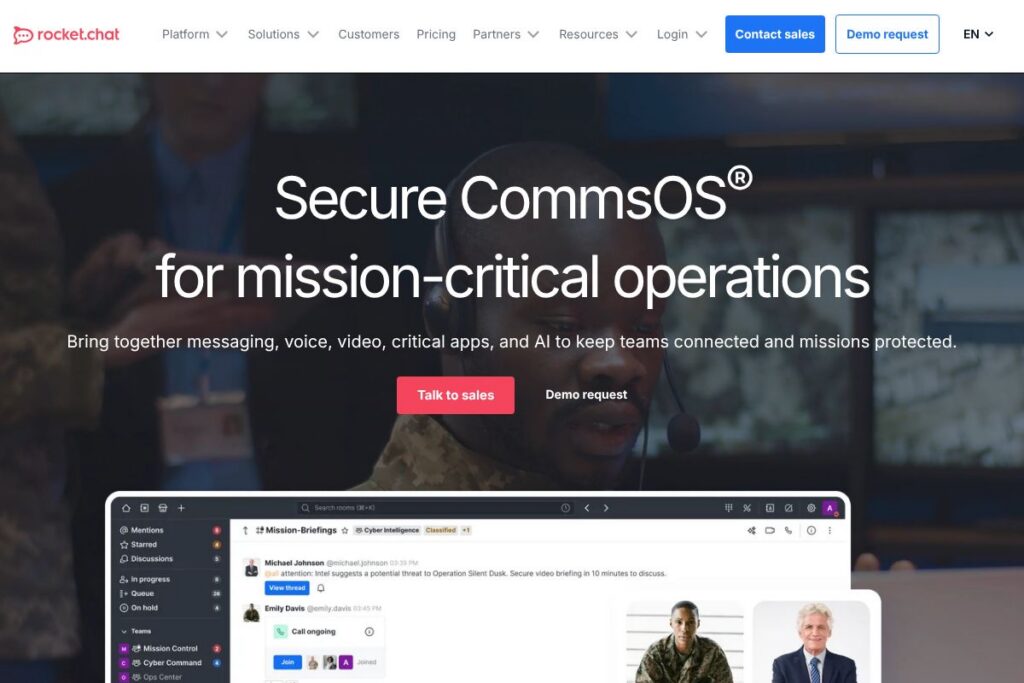
What is Rocket.Chat
Rocket.Chat is a communications platform designed to unify chat, voice, and video with extensibility for apps and bots. It can be self-hosted as a free Community Edition or consumed as a managed cloud product, making it useful for organizations that require control over data, compliance, and deployment.
Compared with Slack and Microsoft Teams, Rocket.Chat emphasizes deployment flexibility and data sovereignty by offering on-premises hosting and federation between independent servers. Against open-source peers like Mattermost, Rocket.Chat places stronger emphasis on built-in federation, bundled voice/video, and a marketplace for apps and integrations that support complex operational workflows.
All of this makes Rocket.Chat particularly well suited for regulated institutions, public sector agencies, and multi-organization coalitions that need secure, auditable communications and the option to extend or integrate the platform with existing systems.
How Rocket.Chat Works
Rocket.Chat runs as a server process that exposes real-time messaging via web, desktop, and mobile clients, and supports direct messaging, public and private channels, threads, and file sharing. Administrators can deploy a single-instance server, a horizontally scaled cluster, or use Rocket.Chat Cloud; the same APIs and apps work across deployment modes.
Federation and bridging let separate Rocket.Chat instances and external systems exchange messages while preserving local control of data, which is useful for joint operations across organizations. Teams typically connect identity providers (LDAP, SAML, OAuth), add bots or AI assistants, and install apps from the marketplace to automate notifications, run workflows, or integrate with ticketing and command systems.
Rocket.Chat features
Rocket.Chat groups core communication, conferencing, federation, security, and developer capabilities into a single platform that can be extended with apps and bots. Recent platform emphasis includes federation, AI-enabled assistants, and improved voice/video performance for low-bandwidth environments.
Real-time Messaging
Text channels, direct messages, threaded replies, searchable history, and message retention policies support structured conversation and rapid situational awareness. These capabilities enable teams to keep timelines, decisions, and attachments together during an operation.
Voice and Video Conferencing
Built-in voice and video let teams start calls from channels or direct messages without separate accounts, and administrators can host media servers for on-premises control. This reduces dependency on third-party conferencing providers while keeping call logs and metadata under organizational governance.
Federation and Multi-Org Collaboration
Federation connects distinct Rocket.Chat instances so teams across agencies or partner organizations can exchange messages while each party maintains its own data controls. This model is designed for coalition environments that need joint decision-making without centralizing sensitive datasets.
Security and Compliance
Rocket.Chat supports end-to-end and transport encryption options, role-based access control, audit logging, and integrations with enterprise identity providers for single sign-on and access governance. These features enable meeting regulatory and audit requirements for public sector and critical infrastructure customers.
AI-powered Conversations
Integrated AI assistants and hooks for external language models let teams automate routine tasks, summarize conversations, and surface relevant documents within chat. Those AI integrations can be deployed to run on-premises or via approved cloud providers to align with data handling policies.
Apps, Integrations, and SDKs
A marketplace of apps plus REST and real-time APIs enable integrations with incident management, SIEM, ticketing, and productivity systems, while SDKs let teams build custom clients and bots. This extensibility supports operational workflows such as automated alerts, command-and-control dashboards, and mission-specific tooling.
Deployment and Management Tools
Administrators get clustering, metrics, backup, and upgrade tooling to manage scale and uptime for mission-critical operations. Combined with monitoring hooks and automation scripts, these tools help maintain resilience and predictable behavior during high-load events.
With these capabilities, Rocket.Chat delivers an integrated communications platform that balances operational flexibility, security controls, and extensibility for teams that need to coordinate across organizational boundaries.
Rocket.Chat pricing
Rocket.Chat offers a mixed pricing approach: a free, open-source Community Edition for self-hosting, and commercial Cloud and Enterprise options for organizations that prefer managed services or enterprise-grade support. Commercial plans are typically tailored to deployment, support, and compliance requirements.
Self-hosted / Open Source
Community Edition – Free (Self-hosted, source code available, community support). Download or review the source code from the project repository on GitHub and follow deployment guides in the official documentation.
Cloud and Enterprise
Cloud / Enterprise – Custom pricing (Managed hosting, SLAs, enterprise support, compliance features). Organizations seeking hosted, supported deployments or additional compliance controls should consult Rocket.Chat’s enterprise solutions or contact sales for tailored quotes and implementation guidance.
For exact plan options and to discuss capacity, compliance, or long-term support, review the deployment and enterprise offerings.
What is Rocket.Chat used for
Rocket.Chat is used to centralize communications across teams, partners, and external stakeholders where control over data and deployment is important. Typical uses include incident response coordination, secure internal communication, partner federation for joint operations, and replacing multiple point tools with a single, auditable platform.
Operational teams use Rocket.Chat to reduce handoffs between email, standalone conferencing, and separate messaging systems by providing persistent channels for units, threaded discussion for tasks, and integrated voice/video for real-time decision-making. IT and security teams use its self-hosting and identity integrations to meet compliance and access control requirements.
Pros and cons of Rocket.Chat
Pros
- Deployment flexibility: Self-hosted or managed cloud deployments allow organizations to choose data residency and control that match regulatory needs.
- Federation for multi-organization collaboration: Built-in federation enables secure message exchange between independent instances, supporting joint work without centralizing all data.
- Extensible platform: The app marketplace, APIs, and SDKs make it straightforward to integrate with incident management, SIEM, and other operational systems.
- Open-source option: Community Edition lets organizations inspect code, customize behavior, and avoid vendor lock-in while benefiting from an active contributor ecosystem.
Cons
- Commercial support required for enterprise features: Advanced compliance, SLAs, and some managed services require commercial Cloud or Enterprise agreements rather than being available in the free edition.
- Operational overhead for self-hosting: Self-hosted deployments need in-house expertise for clustering, upgrades, backups, and media servers to reach the same reliability as managed services.
- Ecosystem maturity vs hyperscalers: While feature-rich, some integrations and third-party apps have smaller ecosystems than large vendors like Microsoft Teams or Slack, requiring custom development for niche requirements.
Does Rocket.Chat Offer a Free Trial?
Rocket.Chat offers a free, open-source Community Edition and commercial trial or demo options for Cloud and Enterprise customers. The Community Edition can be deployed immediately from the GitHub repository or via the download links in the documentation, and organizations interested in hosted or enterprise plans can request demos or trial access through the enterprise contact page.
Rocket.Chat API and Integrations
Rocket.Chat provides REST and RealTime APIs plus SDKs for JavaScript and mobile platforms; the API documentation explains endpoints for messaging, users, and administration. Developers commonly use these APIs to build bots, automate workflows, and integrate Rocket.Chat with monitoring, incident response, and ticketing systems.
Key integrations include identity providers (LDAP, SAML, OAuth), messaging bridges, and connectors for productivity suites and monitoring tools; see the integration catalog for common adapters and connectors.
10 Rocket.Chat alternatives
Paid alternatives to Rocket.Chat
- Slack — Cloud-first team messaging with a large app ecosystem, per-user subscription tiers, and hosted compliance features.
- Microsoft Teams — Integrated with Microsoft 365, combines chat, meetings, and document collaboration for organizations invested in the Microsoft ecosystem.
- Zoom — Focused on video-first collaboration with chat and webinar capabilities and paid plans for enterprise conferencing.
- Cisco Webex — Enterprise conferencing and messaging with on-premises and cloud deployment options and carrier integrations.
- Google Chat — Part of Google Workspace, offering chat and rooms tightly integrated with Google Drive and Gmail.
- Flock — Team messaging and productivity features tailored for small to mid-sized businesses with paid plans for advanced capabilities.
- RingCentral — Unified communications platform combining voice, messaging, and meetings with enterprise telephony and contact center features.
Open source alternatives to Rocket.Chat
- Mattermost — Open-source messaging platform that emphasizes self-hosting, compliance, and developer tooling similar to Rocket.Chat.
- Matrix / Element — Decentralized communication protocol and client that supports federation across servers and end-to-end encryption.
- Jitsi — Open-source video conferencing focused on secure, self-hosted video and meeting capabilities; often paired with other chat systems.
- Nextcloud Talk — Part of the Nextcloud suite, offering self-hosted audio/video and chat integrated with file storage and collaboration tools.
- Zulip — Open-source chat platform with threaded conversations designed for organized, asynchronous team communication.
Frequently asked questions about Rocket.Chat
What is Rocket.Chat used for?
Rocket.Chat is used for secure, centralized team communications including messaging, voice, and video. Organizations use it to replace fragmented tools and to provide auditable communication channels for operations and compliance.
Does Rocket.Chat support self-hosting?
Yes, Rocket.Chat provides a free Community Edition that can be self-hosted. The source code and deployment instructions are available from the official repository and documentation.
Can Rocket.Chat integrate with enterprise identity providers?
Yes, Rocket.Chat integrates with LDAP, SAML, OAuth, and other identity providers for single sign-on and centralized access control. These integrations are documented in the administration guides.
Is Rocket.Chat suitable for federated multi-organization setups?
Yes, Rocket.Chat supports federation so independent instances can exchange messages while retaining local data control. That makes it a fit for coalition operations and multi-agency collaboration.
Does Rocket.Chat have an API for automation and bots?
Yes, Rocket.Chat provides REST and RealTime APIs plus SDKs for building bots, apps, and custom clients. The API reference details available endpoints and authentication methods.
Final verdict: Rocket.Chat
Rocket.Chat stands out for deployment flexibility, data sovereignty, and extensibility, offering a free self-hosted Community Edition alongside managed Cloud and Enterprise options. Its federation capabilities and developer APIs make it suited for organizations that must coordinate across administrative boundaries while retaining control over data and compliance.
Compared to Slack, which primarily uses per-user hosted subscriptions, Rocket.Chat provides a no-license-cost self-hosting route and customizable enterprise deployments that can reduce vendor dependency for regulated environments. For teams that need a balance of built-in conferencing, federation, and customizable integrations under organizational control, Rocket.Chat is a practical choice.