What is JobBOSS²?
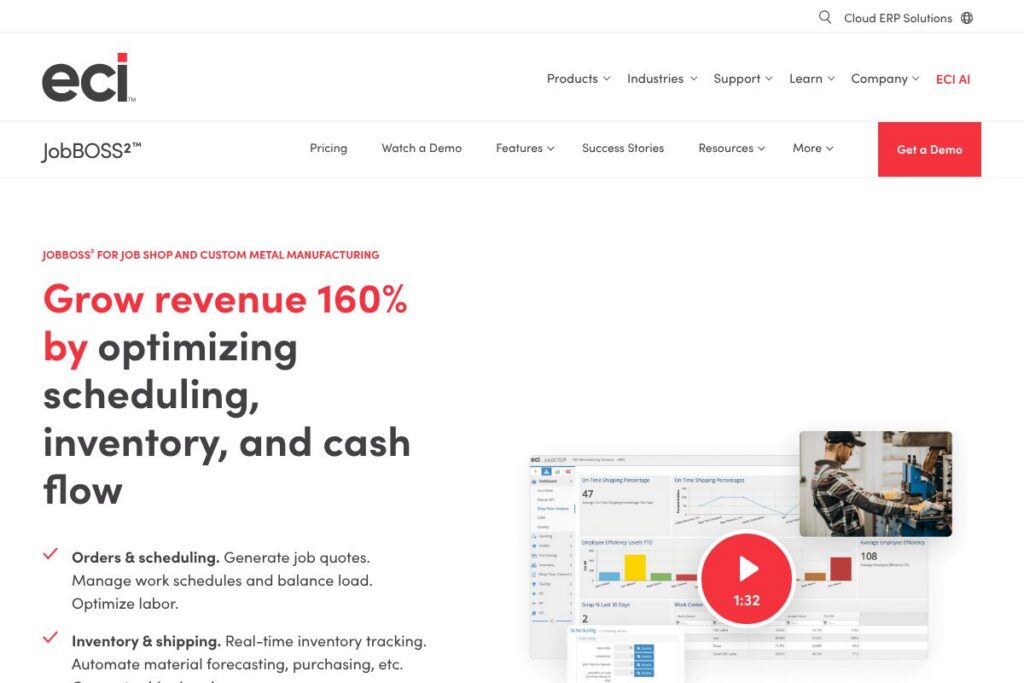
JobBOSS² is a quote-to-cash ERP built specifically for job shops and make-to-order manufacturers. It combines estimating and quoting, job scheduling, material management, shop-floor time capture, quality control, and reporting into a single system so shops can move from quote to delivery without stitching together spreadsheets and point tools. The product places emphasis on real-time job costing and production visibility to help shops protect margins and meet delivery dates.
Compared with enterprise systems, JobBOSS² targets job shops with variable routings and one-off or small-run work. For example, Epicor ERP and Plex provide broader enterprise-grade manufacturing suites that scale across distributed operations, but they often require larger implementation efforts and higher upfront licensing costs. Small shops using accounting-first solutions like QuickBooks plus add-ons can get basic finance coverage but lack the integrated scheduling, BOM intelligence, and shop-floor time tracking that JobBOSS² includes.
JobBOSS² excels at flexible quoting and shop-floor visibility, and it is best suited for machine shops, custom metal fabricators, and mixed-mode manufacturers that need tight control over job costs and schedules. Its feature set and workflow focus make it a practical choice for shops that require accurate job costing, drag-and-drop scheduling, and integrated inventory controls to reduce stockouts and late deliveries.
How JobBOSS² Works
JobBOSS² organizes work around jobs rather than generic projects. A typical flow begins with quote creation, where the estimator builds an estimate, converts it to an order, and generates a bill of materials. That order becomes a scheduled job on the shop calendar, with routings and work centers assigned so the scheduler can balance loads and shift resources as priorities change.
On the shop floor, operators record time and operations using a mobile-friendly time entry or terminal interface, which feeds actual labor and run-time back into job costing. Inventory reservations and picking integrate with jobs so the purchasing team sees material shortfalls and the system can auto-generate purchase orders for required parts.
Reporting pulls estimated versus actual costs, job profitability, and KPIs such as on-time delivery and efficiency. Reports can also integrate with accounting via QuickBooks integration for consolidated AR/AP and payroll reconciliation, and exported shipping documents support fulfillment workflows.
JobBOSS² features
JobBOSS² centers on end-to-end job shop operations with tools for quoting, scheduling, inventory control, quality, and reporting. Recent additions emphasize automation and data capture, including an AI BOM Builder to accelerate bill of materials creation from documents, and tighter connectors to accounting and quality systems.
AI BOM Builder
This feature extracts part lists from PDFs, spreadsheets, images, and CSVs to create draft bills of materials that you can review and edit. It reduces manual data entry when converting quotes or past jobs into new orders, speeding up estimating and setup. Teams benefit by shortening quote cycles and reducing errors that occur when BOMs are hand-typed.
Scheduling & Shop Floor
Scheduling uses a drag-and-drop calendar that visualizes work-center loads and job sequences so schedulers can move operations to avoid bottlenecks. Shift and operation assignments sync to the mobile time-entry interface, allowing operators to record job progress and quantity completed in real time. This keeps lead-time estimates current and supports more accurate delivery commitments.
Job Management
Estimating and quoting flow directly into jobs, with one-click conversion from quote to production order and automatic generation of routing and traveler documents. Shipping documents and packing lists can be created automatically when jobs are completed to speed fulfillment. Job tracking provides status, percent complete, and cost-to-date so managers can identify issues early.
Inventory
Inventory management tracks stock levels in real time, supports multiple locations, and can trigger reorder suggestions or auto-generated purchase orders when thresholds are met. Material reservations against jobs prevent double allocation and reduce unexpected shortages. Forecasting tools use upcoming jobs and historical usage to produce recommended purchase orders.
Quality Management
Quality workflows consolidate documents, inspection records, and equipment calibration tracking in a single area to support consistent compliance. CAPA-like workflows and uniPoint integration enable corrective actions and audit trails for nonconformance events. Centralized quality records make it easier to demonstrate compliance during customer or regulatory reviews.
Reporting
Real-time analytics report on job profitability, resource efficiency, and estimated-versus-actual cost variances, helping managers make pricing and process decisions. QuickBooks integration allows finance teams to reconcile invoicing, payroll, and AR/AP with operational data. Customizable dashboards provide quick visibility into on-time delivery, scrap rates, and labor efficiency.
With these capabilities, JobBOSS² reduces manual touchpoints, helps keep jobs on schedule, and improves visibility into margins so shops can prioritize profitable work.
JobBOSS² pricing
JobBOSS² uses custom subscription pricing tailored to company size, deployment options, and the modules you need; pricing is typically provided via direct sales rather than public fixed tiers. For current details and to request a quote or demo, check the JobBOSS² product page on the vendor site for contact and sales options.
What is JobBOSS² Used For?
JobBOSS² is commonly used for estimating and converting quotes into production orders with accurate cost rollups, scheduling multi-operation jobs across work centers, and tracking labor and material usage against individual jobs. Shops use it to centralize job costing so pricing decisions reflect historical performance and actual resource consumption.
It is also used for inventory control and purchasing automation, where reserve-to-job logic prevents double booking of stock and forecasting reduces emergency buys. Finally, quality and reporting features make it suitable for shops that need traceability, consistent quality workflows, and on-time delivery improvement.
Pros and cons of JobBOSS²
Pros
- Job-centric workflows: The system maps estimating, scheduling, production, and shipping around jobs and routings, which aligns with how job shops operate and simplifies traceability. This reduces overhead from manual coordination and spreadsheets.
- Integrated job costing and reporting: Detailed estimated vs actual comparisons and profitability reports make pricing decisions more informed and help identify where to cut costs. Finance teams benefit from the QuickBooks connector for streamlined invoicing and payroll reconciliation.
- Shop-floor time capture and scheduling: Mobile time entry combined with drag-and-drop scheduling improves accuracy of labor data and helps balance loads across work centers to reduce bottlenecks and late deliveries.
Cons
- Custom implementation effort: Implementation typically requires 3 to 6 months and shop-specific configuration, so smaller shops with limited IT resources may need outside help to get full value. The learning curve for administrators can be significant during rollout.
- Pricing not publicly listed: Because pricing is tailored to each installation, organizations must contact sales for a quote which can slow initial evaluation compared with tools that list transparent tiers. This is common for ERP-class solutions but can be a blocker for quick comparisons.
Does JobBOSS² Offer a Free Trial?
JobBOSS² offers custom demos and sales-led evaluations rather than a public free plan. Prospective customers can request a live demo or ask sales about a limited evaluation period and implementation timeline; contact options are available through the JobBOSS² product page for scheduling demonstrations and discovery calls.
JobBOSS² API and Integrations
JobBOSS² provides integration options and developer APIs to connect with accounting, quality, and shop automation systems; developers can consult the vendor’s integration resources for available endpoints and connector details. Common integrations include accounting systems like QuickBooks and quality modules such as uniPoint, which extend financial reconciliation and quality workflows respectively.
For integration planning and developer guidance, review the JobBOSS² integration and API resources on the vendor site or contact their technical team to confirm supported endpoints and connector availability.
10 JobBOSS² alternatives
Paid alternatives to JobBOSS²
- Epicor ERP — A full-featured enterprise resource planning suite for discrete and mixed-mode manufacturers, often chosen by larger shops requiring deep industry modules and global scaling; see the Epicor ERP product page for details.
- Plex Manufacturing Cloud — A cloud-native MES and ERP that emphasizes real-time production control and traceability for manufacturers with high regulatory or traceability needs; explore Plex Manufacturing Cloud for capabilities.
- Fishbowl — Inventory-centric manufacturing and warehouse management that pairs with QuickBooks for users who need stronger inventory controls without a full ERP; visit Fishbowl Inventory for product information.
- MRPeasy — An accessible cloud-based MRP with modules for production planning, purchasing, and inventory geared toward small manufacturers; check MRPeasy for pricing and features.
- Katana MRP — A visual production planning tool focused on small manufacturers and makers, offering live inventory and order routing to simplify shop scheduling; learn more at Katana MRP.
- JobBOSS (legacy / E2 Shop System) — The original E2/JobBOSS lineage products are still in the market and may suit shops preferring on-premise or legacy feature sets; consult the JobBOSS product pages for migration options.
Open source alternatives to JobBOSS²
- Odoo — A modular open source ERP with manufacturing, inventory, and MRP modules that can be extended for job-shop workflows; see Odoo’s manufacturing apps for module details.
- ERPNext — An open source ERP with manufacturing, quality, and inventory management suitable for small to mid-size manufacturers that want self-hosted control; review ERPNext manufacturing documentation.
- inoERP — A lightweight open source ERP with manufacturing and inventory features for teams that can customize and self-host; explore inoERP for developer resources.
- Apache OFBiz — An open source enterprise automation suite that includes order management and inventory components for teams willing to build custom job-shop processes; visit Apache OFBiz for community resources.
- metasfresh — An open source ERP focused on flexibility for small and medium businesses with manufacturing and inventory modules; learn more at metasfresh.
Frequently asked questions about JobBOSS²
What is JobBOSS² used for?
JobBOSS² is used to manage quoting, scheduling, inventory, shop-floor time capture, and job costing for job shops and custom manufacturers. Shops use it to convert quotes into production orders, schedule operations, and measure estimated versus actual costs.
How does JobBOSS² improve job shop profitability?
JobBOSS² improves profitability by providing accurate job costing, real-time inventory control, and production visibility. These capabilities reduce manual errors, prevent stockouts, and reveal cost variances that inform pricing and process changes.
Does JobBOSS² integrate with QuickBooks?
Yes, JobBOSS² offers integration with QuickBooks for financial sync, invoicing, and payroll reconciliation. The connector helps align operational job data with accounting records to reduce reconciliation work.
Can JobBOSS² handle complex job shop scheduling?
Yes, JobBOSS² includes a drag-and-drop scheduling module and shop-floor tracking to manage multi-step jobs and balance workloads. Schedulers can move operations, assign shifts, and track actual progress to minimize bottlenecks.
Is JobBOSS² suitable for small machine shops?
JobBOSS² is well suited to small and mid-sized machine shops that require flexible quote-to-cash workflows and detailed job costing. It is especially helpful for make-to-order shops that need to track one-off parts and variable routings.
Final verdict: JobBOSS²
JobBOSS² offers a focused, job-shop oriented ERP that combines quoting, scheduling, inventory, quality, and reporting into workflows that mirror how custom manufacturers operate. It stands out for job-centric costing, the AI BOM Builder to accelerate BOM creation, and shop-floor time capture that feeds accurate profitability reports, which together help shops improve delivery performance and margin visibility.
Compared with larger enterprise suites such as Epicor ERP, JobBOSS² typically delivers a lower total cost of ownership for small to mid-sized job shops and a faster path to usable shop-floor functionality. Epicor is feature-rich and suited to large, multi-site manufacturers, but JobBOSS² is often the more practical option for shops that want job-focused controls and quicker implementation; for pricing and to evaluate which approach fits your shop, review the JobBOSS² product page or contact their sales team.